Architecture, PKI fundamentals, certificate automation, authentication workflows, real-world use cases, deployment, security, and troubleshooting
This tutorial explains three important components of the Nexus Smart ID security ecosystem, starting from basic concepts and progressing to practical enterprise architecture and operations.
The guide is based on Nexus’s official documentation, including the Certificate Manager 8.15 documentation and Hermod 4.x deployment guidance. Exact configurations and supported functionality can differ by version and license.
1. Introduction: Why do organizations need these components?
Imagine a large organization managing:
- 5,000 employee laptops and smartphones.
- 2,000 web servers, microservices, and APIs.
- 10,000 IoT devices and connected vehicles.
- Hundreds of network devices, including VPN gateways, routers, and firewalls.
- Thousands of employees requiring secure authentication and digital signatures.
Every device, application, and employee needs a trustworthy digital identity.
Traditional authentication using usernames and passwords is not always sufficient. Enterprises increasingly use digital certificates, cryptographic keys, and Public Key Infrastructure (PKI) to establish trusted identities.
This creates several challenges:
- Who is responsible for issuing digital certificates?
- How can thousands of devices request certificates automatically?
- How can certificates be renewed before they expire?
- How can an organization prevent unauthorized devices from obtaining certificates?
- How can administrators authenticate securely before managing sensitive certificates?
- How can compromised certificates be revoked?
- How can the entire system be monitored, audited, and operated securely?
This is where Nexus Certificate Manager, Protocol Gateway, and Hermod come into the picture.
2. Understanding the three components
Nexus Certificate Manager (CM)
The central PKI platform. It manages Certificate Authorities (CAs), digital certificates, issuance policies, revocation, and certificate lifecycle operations.
Nexus Protocol Gateway (PGWY)
The certificate enrollment gateway. It allows servers, applications, and devices to communicate with Certificate Manager using standard protocols such as ACME, SCEP, EST, and CMP.
Nexus Hermod Services
The authentication, signing, and messaging service. It coordinates secure interactions with Nexus Personal Desktop Client and Smart ID Mobile App, including officer authentication for Certificate Manager Web UI.
These roles are described in Nexus’s Certificate Manager, Protocol Gateway, and Hermod documentation. Nexus Documentation+2
A simple analogy
Think of an organization that issues employee identification cards.
| Component | Real-world analogy | Technical responsibility |
|---|---|---|
| Certificate Manager | Government identity issuing authority | Creates, issues, and manages trusted digital identities |
| Protocol Gateway | Online application and processing counter | Receives and processes certificate enrollment requests |
| Hermod | Secure identity verification and signing service | Coordinates authentication and signing operations |
The essential distinction: Certificate Manager handles the PKI authority, Protocol Gateway handles enrollment interfaces, and Hermod handles authentication and signing workflows.
All three can participate in one deployment, but Hermod is not required for every automated certificate enrollment request. For example, an ACME client can obtain a server certificate through PGWY and CM without involving Hermod.
3. PKI fundamentals you should understand first
Before exploring the components individually, it helps to understand six fundamental concepts.
| Concept | Explanation |
|---|---|
| Public Key Infrastructure (PKI) | A system of policies, technologies, keys, certificates, and trusted authorities used to establish digital trust |
| Certificate Authority (CA) | A trusted authority that digitally signs and issues certificates |
| Digital certificate | An electronic credential, commonly X.509, that binds an identity to a public key |
| Public/private key pair | Related cryptographic keys used for authentication, signing, and related security operations |
| Certificate Signing Request (CSR) | A request containing a public key and identifying information, submitted for certificate issuance |
| Certificate revocation | A mechanism for marking a previously issued certificate as no longer trusted before its expiration |
Example: How a digital certificate establishes trust
Consider a web application hosted at api.example.com.
The application generates a private key and a CSR containing its public key and requested domain identity.
A Certificate Authority validates the request and signs a certificate.
The web server installs the certificate, and its private key remains protected.
When a client connects using HTTPS, the TLS handshake verifies the server’s certificate chain and hostname and proves that the server possesses the corresponding private key.
Server generates private key + CSRPrivate key remains with the server
CA validates the request and signs the certificateTrust depends on CA policy and validation
Server installs the issued certificateCertificate is presented during TLS negotiation
Client establishes a trusted TLS connection
When certificate verification succeeds
There is an important difference between public certificates and private enterprise certificates.
Public certificates are issued by publicly trusted CAs and are usually trusted by operating systems and browsers automatically. Private CA certificates require the organization’s root or intermediate CA trust chain to be installed and trusted by the appropriate clients.
Nexus CM can operate private enterprise PKI infrastructures; using it does not automatically make issued certificates publicly trusted.
4. Nexus Certificate Manager (CM) — In depth
4.1 What exactly is Nexus CM?
Nexus Smart ID Certificate Manager is an enterprise PKI platform that operates Certificate Authorities and manages the lifecycle of digital certificates.
It provides the infrastructure required to issue, renew, revoke, publish, and validate certificates.
Rather than running separate certificate authorities for every application, an enterprise can use Nexus CM to centralize certificate management while maintaining separate issuing policies for different business units, environments, and device categories.
For example, a company might operate separate CAs for:
- Employee authentication certificates.
- Internal application and server TLS certificates.
- Network and VPN device certificates.
- Manufacturing and IoT device identities.
- Connected vehicle communication certificates.
Nexus CM supports multiple CAs, certificate policies, administrative roles, and high-availability configurations. Nexus Documentation+1
4.2 Core components inside Nexus CM
Nexus Certificate Manager is not merely one application. It includes several cooperating services.
| Component | Full name | Responsibility |
|---|---|---|
| CF | Certificate Factory | Processes requests, applies policies, and prepares certificates |
| CIS | Certificate Issuing System | Cryptographically signs certificates and CRLs |
| CMDB | Certificate Manager Database | Stores registrations, certificates, revocation data, and other operational information |
| HSM | Hardware Security Module | Protects and uses cryptographic keys, particularly CA signing keys |
| DA | Distribution Agent | Publishes certificates and revocation information |
| AWB | Administrator’s Workbench | Defines CA configuration, policies, and procedures |
| RA | Registration Authority client | Supports identity registration and certificate enrollment administration |
| CM Web UI | Certificate Manager Web UI | Browser-based interface for common certificate management operations |
The underlying CF and CIS responsibilities are documented separately by Nexus. HSM protection is strongly recommended for production CA signing keys. Nexus Documentation+1
4.3 How CM works internally
#chatgpt-mermaid-_r_nr_{font-family:-apple-system-body,ui-sans-serif,-apple-system,system-ui,”Segoe UI”,Helvetica,”Apple Color Emoji”,Arial,sans-serif,”Segoe UI Emoji”,”Segoe UI Symbol”;font-size:16px;fill:rgb(13, 13, 13);}@keyframes edge-animation-frame{from{stroke-dashoffset:0;}}@keyframes dash{to{stroke-dashoffset:0;}}#chatgpt-mermaid-_r_nr_ .edge-animation-slow{stroke-dasharray:9,5!important;stroke-dashoffset:900;animation:dash 50s linear infinite;stroke-linecap:round;}#chatgpt-mermaid-_r_nr_ .edge-animation-fast{stroke-dasharray:9,5!important;stroke-dashoffset:900;animation:dash 20s linear infinite;stroke-linecap:round;}#chatgpt-mermaid-_r_nr_ .error-icon{fill:rgb(243, 243, 243);}#chatgpt-mermaid-_r_nr_ .error-text{fill:rgb(13, 13, 13);stroke:rgb(13, 13, 13);}#chatgpt-mermaid-_r_nr_ .edge-thickness-normal{stroke-width:1px;}#chatgpt-mermaid-_r_nr_ .edge-thickness-thick{stroke-width:3.5px;}#chatgpt-mermaid-_r_nr_ .edge-pattern-solid{stroke-dasharray:0;}#chatgpt-mermaid-_r_nr_ .edge-thickness-invisible{stroke-width:0;fill:none;}#chatgpt-mermaid-_r_nr_ .edge-pattern-dashed{stroke-dasharray:3;}#chatgpt-mermaid-_r_nr_ .edge-pattern-dotted{stroke-dasharray:2;}#chatgpt-mermaid-_r_nr_ .marker{fill:rgb(143, 143, 143);stroke:rgb(143, 143, 143);}#chatgpt-mermaid-_r_nr_ .marker.cross{stroke:rgb(143, 143, 143);}#chatgpt-mermaid-_r_nr_ svg{font-family:-apple-system-body,ui-sans-serif,-apple-system,system-ui,”Segoe UI”,Helvetica,”Apple Color Emoji”,Arial,sans-serif,”Segoe UI Emoji”,”Segoe UI Symbol”;font-size:16px;}#chatgpt-mermaid-_r_nr_ p{margin:0;}#chatgpt-mermaid-_r_nr_ .label{font-family:-apple-system-body,ui-sans-serif,-apple-system,system-ui,”Segoe UI”,Helvetica,”Apple Color Emoji”,Arial,sans-serif,”Segoe UI Emoji”,”Segoe UI Symbol”;color:rgb(13, 13, 13);}#chatgpt-mermaid-_r_nr_ .cluster-label text{fill:rgb(13, 13, 13);}#chatgpt-mermaid-_r_nr_ .cluster-label span{color:rgb(13, 13, 13);}#chatgpt-mermaid-_r_nr_ .cluster-label span p{background-color:transparent;}#chatgpt-mermaid-_r_nr_ .label text,#chatgpt-mermaid-_r_nr_ span{fill:rgb(13, 13, 13);color:rgb(13, 13, 13);}#chatgpt-mermaid-_r_nr_ .node rect,#chatgpt-mermaid-_r_nr_ .node circle,#chatgpt-mermaid-_r_nr_ .node ellipse,#chatgpt-mermaid-_r_nr_ .node polygon,#chatgpt-mermaid-_r_nr_ .node path{fill:rgb(222, 234, 251);stroke:rgb(83, 154, 248);stroke-width:1px;}#chatgpt-mermaid-_r_nr_ .rough-node .label text,#chatgpt-mermaid-_r_nr_ .node .label text,#chatgpt-mermaid-_r_nr_ .image-shape .label,#chatgpt-mermaid-_r_nr_ .icon-shape .label{text-anchor:middle;}#chatgpt-mermaid-_r_nr_ .node .katex path{fill:#000;stroke:#000;stroke-width:1px;}#chatgpt-mermaid-_r_nr_ .rough-node .label,#chatgpt-mermaid-_r_nr_ .node .label,#chatgpt-mermaid-_r_nr_ .image-shape .label,#chatgpt-mermaid-_r_nr_ .icon-shape .label{text-align:center;}#chatgpt-mermaid-_r_nr_ .node.clickable{cursor:pointer;}#chatgpt-mermaid-_r_nr_ .root .anchor path{fill:rgb(143, 143, 143)!important;stroke-width:0;stroke:rgb(143, 143, 143);}#chatgpt-mermaid-_r_nr_ .arrowheadPath{fill:rgb(143, 143, 143);}#chatgpt-mermaid-_r_nr_ .edgePath .path{stroke:rgb(143, 143, 143);stroke-width:1px;}#chatgpt-mermaid-_r_nr_ .flowchart-link{stroke:rgb(143, 143, 143);fill:none;}#chatgpt-mermaid-_r_nr_ .edgeLabel{background-color:rgb(252, 252, 252);text-align:center;}#chatgpt-mermaid-_r_nr_ .edgeLabel p{background-color:rgb(252, 252, 252);}#chatgpt-mermaid-_r_nr_ .edgeLabel rect{opacity:0.5;background-color:rgb(252, 252, 252);fill:rgb(252, 252, 252);}#chatgpt-mermaid-_r_nr_ .labelBkg{background-color:rgba(252, 252, 252, 0.5);}#chatgpt-mermaid-_r_nr_ .cluster rect{fill:rgb(243, 243, 243);stroke:rgba(0, 0, 0, 0.1);stroke-width:1px;}#chatgpt-mermaid-_r_nr_ .cluster text{fill:rgb(13, 13, 13);}#chatgpt-mermaid-_r_nr_ .cluster span{color:rgb(13, 13, 13);}#chatgpt-mermaid-_r_nr_ div.mermaidTooltip{position:absolute;text-align:center;max-width:200px;padding:2px;font-family:-apple-system-body,ui-sans-serif,-apple-system,system-ui,”Segoe UI”,Helvetica,”Apple Color Emoji”,Arial,sans-serif,”Segoe UI Emoji”,”Segoe UI Symbol”;font-size:12px;background:rgb(243, 243, 243);border:1px solid rgba(0, 0, 0, 0.1);border-radius:2px;pointer-events:none;z-index:100;}#chatgpt-mermaid-_r_nr_ .flowchartTitleText{text-anchor:middle;font-size:18px;fill:rgb(13, 13, 13);}#chatgpt-mermaid-_r_nr_ rect.text{fill:none;stroke-width:0;}#chatgpt-mermaid-_r_nr_ .icon-shape,#chatgpt-mermaid-_r_nr_ .image-shape{background-color:rgb(252, 252, 252);text-align:center;}#chatgpt-mermaid-_r_nr_ .icon-shape p,#chatgpt-mermaid-_r_nr_ .image-shape p{background-color:rgb(252, 252, 252);padding:2px;}#chatgpt-mermaid-_r_nr_ .icon-shape .label rect,#chatgpt-mermaid-_r_nr_ .image-shape .label rect{opacity:0.5;background-color:rgb(252, 252, 252);fill:rgb(252, 252, 252);}#chatgpt-mermaid-_r_nr_ .label-icon{display:inline-block;height:1em;overflow:visible;vertical-align:-0.125em;}#chatgpt-mermaid-_r_nr_ .node .label-icon path{fill:currentColor;stroke:revert;stroke-width:revert;}#chatgpt-mermaid-_r_nr_ .node .neo-node{stroke:rgb(83, 154, 248);}#chatgpt-mermaid-_r_nr_ [data-look=”neo”].node rect,#chatgpt-mermaid-_r_nr_ [data-look=”neo”].cluster rect,#chatgpt-mermaid-_r_nr_ [data-look=”neo”].node polygon{stroke:url(#chatgpt-mermaid-_r_nr_-gradient);filter:drop-shadow( 1px 2px 2px rgba(185,185,185,1));}#chatgpt-mermaid-_r_nr_ [data-look=”neo”].swimlane.cluster rect{filter:none;}#chatgpt-mermaid-_r_nr_ [data-look=”neo”].node path{stroke:url(#chatgpt-mermaid-_r_nr_-gradient);stroke-width:1px;}#chatgpt-mermaid-_r_nr_ [data-look=”neo”].node .outer-path{filter:drop-shadow( 1px 2px 2px rgba(185,185,185,1));}#chatgpt-mermaid-_r_nr_ [data-look=”neo”].node .neo-line path{stroke:rgb(83, 154, 248);filter:none;}#chatgpt-mermaid-_r_nr_ [data-look=”neo”].node circle{stroke:url(#chatgpt-mermaid-_r_nr_-gradient);filter:drop-shadow( 1px 2px 2px rgba(185,185,185,1));}#chatgpt-mermaid-_r_nr_ [data-look=”neo”].node circle .state-start{fill:#000000;}#chatgpt-mermaid-_r_nr_ [data-look=”neo”].icon-shape .icon{fill:url(#chatgpt-mermaid-_r_nr_-gradient);filter:drop-shadow( 1px 2px 2px rgba(185,185,185,1));}#chatgpt-mermaid-_r_nr_ [data-look=”neo”].icon-shape .icon-neo path{stroke:url(#chatgpt-mermaid-_r_nr_-gradient);filter:drop-shadow( 1px 2px 2px rgba(185,185,185,1));}#chatgpt-mermaid-_r_nr_ .node text{font-size:14px;font-weight:600;letter-spacing:normal;fill:rgb(0, 79, 153);}#chatgpt-mermaid-_r_nr_ .edgeLabels text{font-size:13px;font-weight:600;letter-spacing:-0.08px;fill:rgb(0, 79, 153);}#chatgpt-mermaid-_r_nr_ .node tspan[font-weight=”normal”],#chatgpt-mermaid-_r_nr_ .edgeLabels tspan[font-weight=”normal”]{font-weight:600;}#chatgpt-mermaid-_r_nr_ .edgeLabel .label rect{opacity:1;rx:13px;ry:13px;fill:rgb(245, 250, 255);stroke:rgb(206, 219, 229);stroke-width:1px;}#chatgpt-mermaid-_r_nr_ .node rect,#chatgpt-mermaid-_r_nr_ .node circle,#chatgpt-mermaid-_r_nr_ .node ellipse,#chatgpt-mermaid-_r_nr_ .node polygon,#chatgpt-mermaid-_r_nr_ .node path{fill:rgb(229, 243, 255);stroke:rgba(0, 0, 0, 0.1);stroke-width:1px;}#chatgpt-mermaid-_r_nr_ .node rect{rx:16px;ry:16px;}#chatgpt-mermaid-_r_nr_ .mermaid-decision .label-container{fill:rgb(245, 250, 255);stroke:rgb(206, 219, 229);stroke-dasharray:2,2;}#chatgpt-mermaid-_r_nr_ .edgePaths .flowchart-link{stroke:rgb(143, 143, 143);stroke-width:1px;stroke-linecap:round;stroke-linejoin:round;}#chatgpt-mermaid-_r_nr_ .marker{fill:rgb(143, 143, 143);stroke:rgb(143, 143, 143);}#chatgpt-mermaid-_r_nr_ :root{–mermaid-font-family:-apple-system-body,ui-sans-serif,-apple-system,system-ui,”Segoe UI”,Helvetica,”Apple Color Emoji”,Arial,sans-serif,”Segoe UI Emoji”,”Segoe UI Symbol”;}#chatgpt-mermaid-_r_nr_ .endpoint rect{fill:rgb(220, 234, 255)!important;stroke:rgb(102, 151, 210)!important;color:rgb(18, 59, 104)!important;}#chatgpt-mermaid-_r_nr_ .endpoint polygon{fill:rgb(220, 234, 255)!important;stroke:rgb(102, 151, 210)!important;color:rgb(18, 59, 104)!important;}#chatgpt-mermaid-_r_nr_ .endpoint ellipse{fill:rgb(220, 234, 255)!important;stroke:rgb(102, 151, 210)!important;color:rgb(18, 59, 104)!important;}#chatgpt-mermaid-_r_nr_ .endpoint circle{fill:rgb(220, 234, 255)!important;stroke:rgb(102, 151, 210)!important;color:rgb(18, 59, 104)!important;}#chatgpt-mermaid-_r_nr_ .endpoint path{fill:rgb(220, 234, 255)!important;stroke:rgb(102, 151, 210)!important;color:rgb(18, 59, 104)!important;}#chatgpt-mermaid-_r_nr_ .endpoint tspan{fill:rgb(18, 59, 104)!important;}#chatgpt-mermaid-_r_nr_ .core rect{fill:rgb(227, 244, 238)!important;stroke:rgb(105, 169, 146)!important;color:rgb(19, 88, 70)!important;}#chatgpt-mermaid-_r_nr_ .core polygon{fill:rgb(227, 244, 238)!important;stroke:rgb(105, 169, 146)!important;color:rgb(19, 88, 70)!important;}#chatgpt-mermaid-_r_nr_ .core ellipse{fill:rgb(227, 244, 238)!important;stroke:rgb(105, 169, 146)!important;color:rgb(19, 88, 70)!important;}#chatgpt-mermaid-_r_nr_ .core circle{fill:rgb(227, 244, 238)!important;stroke:rgb(105, 169, 146)!important;color:rgb(19, 88, 70)!important;}#chatgpt-mermaid-_r_nr_ .core path{fill:rgb(227, 244, 238)!important;stroke:rgb(105, 169, 146)!important;color:rgb(19, 88, 70)!important;}#chatgpt-mermaid-_r_nr_ .core tspan{fill:rgb(19, 88, 70)!important;}Certificate requestCertificate Factory (CF)Certificate Manager DBCertificate Issuing System(CIS)HSM / protected CA keyEnrollment clientDistribution AgentCRL / certificate publicationRead / writeAuthorized signing requestCryptographic operationSigned certificateIssued certificate
The flow works as follows:
- A certificate enrollment request arrives through an authorized interface.
- Certificate Factory identifies the appropriate certificate procedure and issuing authority.
- The system validates the request against configured policies and registration requirements.
- Certificate Factory prepares the certificate data.
- Certificate Issuing System performs the CA signing operation, using the configured key storage.
- The signed certificate is returned through the enrollment interface.
- Certificate Manager records the issuance and makes the certificate available for subsequent lifecycle operations.
- Distribution services publish certificate or revocation information as configured.
Important: The CA’s private signing key is different from the application’s private key. In a normal CSR-based enrollment workflow, the application generates and retains its private key; the CA signs the certificate containing the corresponding public key.
4.4 Understanding certificate lifecycle management
Certificate management does not end after issuance.
STEP 01
Registration
Identify and authorize the request
STEP 02
Enrollment
Receive CSR and validate identity
STEP 03
Issuance
Sign and deliver certificate
STEP 04
Deployment
Install certificate in application
STEP 05
Renewal
Replace before expiration
STEP 06
Revocation
Invalidate when required
A well-managed PKI also includes key rotation, certificate inventory, audits, CA certificate rollover, and revocation information publishing.
4.5 Real-world use case: Employee VPN authentication
Suppose an organization uses certificate-based authentication for employee VPN access.
The typical workflow is:
- An employee or managed device is enrolled through an approved identity process.
- A device or user key pair is generated.
- The organization’s registration process authorizes the certificate request.
- Nexus CM issues a client authentication certificate.
- The certificate is installed on the authorized endpoint.
- The VPN infrastructure validates the certificate during authentication.
- If the employee leaves the company or the credential is compromised, the certificate can be revoked.
The VPN server must trust the issuing CA and enforce the configured authentication and revocation policies.
Business value: Centralized management, strong device or user identity, revocation capabilities, and a documented audit trail.
5. Nexus Protocol Gateway (PGWY) — In depth
5.1 What is PGWY?
Protocol Gateway is the integration layer between external certificate clients and Nexus Certificate Manager.
Servers, routers, applications, and IoT devices do not all understand the same certificate enrollment protocol.
Some understand ACME. Others use SCEP, EST, or CMP.
Protocol Gateway exposes the appropriate interface and connects authorized enrollment requests to Certificate Manager.
It is not itself the Certificate Authority. It relies on the CM back-end for issuance and certificate lifecycle operations. Nexus Documentation+1
5.2 Certificate enrollment protocols supported by PGWY
| Protocol | Full name | Typical use case |
|---|---|---|
| ACME | Automatic Certificate Management Environment | Automated TLS certificates for servers and applications |
| SCEP | Simple Certificate Enrollment Protocol | Routers, firewalls, MDM-managed devices |
| EST | Enrollment over Secure Transport | Secure initial enrollment and certificate renewal |
| CMP | Certificate Management Protocol | Telecom equipment and managed devices |
| CMC | Certificate Management over CMS | PKI clients requiring CMS-based certificate management |
| WinEP | Windows Enrollment Proxy | Windows certificate enrollment workflows |
| CM REST API | Certificate Manager REST API | Custom applications and integrations |
These are documented in the Certificate Manager 8.15 interoperability specification. Available features can depend on product version, licensing, and protocol configuration. Nexus Documentation+1
5.3 How PGWY processes a request
flowchart TD
    A["Device or application"] -->|"Certificate enrollment"| B["Protocol Gateway"]
    B --> C{"Authentication and validation"}
    C -->|"Rejected"| X["Return enrollment error"]
    C -->|"Authorized"| D["Select policy / token procedure"]
    D --> E["Certificate Factory"]
    E --> F["Certificate Issuing System"]
    F --> G["Certificate issued"]
    G --> B
    B --> H["Certificate delivered to client"]
#chatgpt-mermaid-_r_on_{font-family:-apple-system-body,ui-sans-serif,-apple-system,system-ui,”Segoe UI”,Helvetica,”Apple Color Emoji”,Arial,sans-serif,”Segoe UI Emoji”,”Segoe UI Symbol”;font-size:16px;fill:rgb(13, 13, 13);}@keyframes edge-animation-frame{from{stroke-dashoffset:0;}}@keyframes dash{to{stroke-dashoffset:0;}}#chatgpt-mermaid-_r_on_ .edge-animation-slow{stroke-dasharray:9,5!important;stroke-dashoffset:900;animation:dash 50s linear infinite;stroke-linecap:round;}#chatgpt-mermaid-_r_on_ .edge-animation-fast{stroke-dasharray:9,5!important;stroke-dashoffset:900;animation:dash 20s linear infinite;stroke-linecap:round;}#chatgpt-mermaid-_r_on_ .error-icon{fill:rgb(243, 243, 243);}#chatgpt-mermaid-_r_on_ .error-text{fill:rgb(13, 13, 13);stroke:rgb(13, 13, 13);}#chatgpt-mermaid-_r_on_ .edge-thickness-normal{stroke-width:1px;}#chatgpt-mermaid-_r_on_ .edge-thickness-thick{stroke-width:3.5px;}#chatgpt-mermaid-_r_on_ .edge-pattern-solid{stroke-dasharray:0;}#chatgpt-mermaid-_r_on_ .edge-thickness-invisible{stroke-width:0;fill:none;}#chatgpt-mermaid-_r_on_ .edge-pattern-dashed{stroke-dasharray:3;}#chatgpt-mermaid-_r_on_ .edge-pattern-dotted{stroke-dasharray:2;}#chatgpt-mermaid-_r_on_ .marker{fill:rgb(143, 143, 143);stroke:rgb(143, 143, 143);}#chatgpt-mermaid-_r_on_ .marker.cross{stroke:rgb(143, 143, 143);}#chatgpt-mermaid-_r_on_ svg{font-family:-apple-system-body,ui-sans-serif,-apple-system,system-ui,”Segoe UI”,Helvetica,”Apple Color Emoji”,Arial,sans-serif,”Segoe UI Emoji”,”Segoe UI Symbol”;font-size:16px;}#chatgpt-mermaid-_r_on_ p{margin:0;}#chatgpt-mermaid-_r_on_ .label{font-family:-apple-system-body,ui-sans-serif,-apple-system,system-ui,”Segoe UI”,Helvetica,”Apple Color Emoji”,Arial,sans-serif,”Segoe UI Emoji”,”Segoe UI Symbol”;color:rgb(13, 13, 13);}#chatgpt-mermaid-_r_on_ .cluster-label text{fill:rgb(13, 13, 13);}#chatgpt-mermaid-_r_on_ .cluster-label span{color:rgb(13, 13, 13);}#chatgpt-mermaid-_r_on_ .cluster-label span p{background-color:transparent;}#chatgpt-mermaid-_r_on_ .label text,#chatgpt-mermaid-_r_on_ span{fill:rgb(13, 13, 13);color:rgb(13, 13, 13);}#chatgpt-mermaid-_r_on_ .node rect,#chatgpt-mermaid-_r_on_ .node circle,#chatgpt-mermaid-_r_on_ .node ellipse,#chatgpt-mermaid-_r_on_ .node polygon,#chatgpt-mermaid-_r_on_ .node path{fill:rgb(222, 234, 251);stroke:rgb(83, 154, 248);stroke-width:1px;}#chatgpt-mermaid-_r_on_ .rough-node .label text,#chatgpt-mermaid-_r_on_ .node .label text,#chatgpt-mermaid-_r_on_ .image-shape .label,#chatgpt-mermaid-_r_on_ .icon-shape .label{text-anchor:middle;}#chatgpt-mermaid-_r_on_ .node .katex path{fill:#000;stroke:#000;stroke-width:1px;}#chatgpt-mermaid-_r_on_ .rough-node .label,#chatgpt-mermaid-_r_on_ .node .label,#chatgpt-mermaid-_r_on_ .image-shape .label,#chatgpt-mermaid-_r_on_ .icon-shape .label{text-align:center;}#chatgpt-mermaid-_r_on_ .node.clickable{cursor:pointer;}#chatgpt-mermaid-_r_on_ .root .anchor path{fill:rgb(143, 143, 143)!important;stroke-width:0;stroke:rgb(143, 143, 143);}#chatgpt-mermaid-_r_on_ .arrowheadPath{fill:rgb(143, 143, 143);}#chatgpt-mermaid-_r_on_ .edgePath .path{stroke:rgb(143, 143, 143);stroke-width:1px;}#chatgpt-mermaid-_r_on_ .flowchart-link{stroke:rgb(143, 143, 143);fill:none;}#chatgpt-mermaid-_r_on_ .edgeLabel{background-color:rgb(252, 252, 252);text-align:center;}#chatgpt-mermaid-_r_on_ .edgeLabel p{background-color:rgb(252, 252, 252);}#chatgpt-mermaid-_r_on_ .edgeLabel rect{opacity:0.5;background-color:rgb(252, 252, 252);fill:rgb(252, 252, 252);}#chatgpt-mermaid-_r_on_ .labelBkg{background-color:rgba(252, 252, 252, 0.5);}#chatgpt-mermaid-_r_on_ .cluster rect{fill:rgb(243, 243, 243);stroke:rgba(0, 0, 0, 0.1);stroke-width:1px;}#chatgpt-mermaid-_r_on_ .cluster text{fill:rgb(13, 13, 13);}#chatgpt-mermaid-_r_on_ .cluster span{color:rgb(13, 13, 13);}#chatgpt-mermaid-_r_on_ div.mermaidTooltip{position:absolute;text-align:center;max-width:200px;padding:2px;font-family:-apple-system-body,ui-sans-serif,-apple-system,system-ui,”Segoe UI”,Helvetica,”Apple Color Emoji”,Arial,sans-serif,”Segoe UI Emoji”,”Segoe UI Symbol”;font-size:12px;background:rgb(243, 243, 243);border:1px solid rgba(0, 0, 0, 0.1);border-radius:2px;pointer-events:none;z-index:100;}#chatgpt-mermaid-_r_on_ .flowchartTitleText{text-anchor:middle;font-size:18px;fill:rgb(13, 13, 13);}#chatgpt-mermaid-_r_on_ rect.text{fill:none;stroke-width:0;}#chatgpt-mermaid-_r_on_ .icon-shape,#chatgpt-mermaid-_r_on_ .image-shape{background-color:rgb(252, 252, 252);text-align:center;}#chatgpt-mermaid-_r_on_ .icon-shape p,#chatgpt-mermaid-_r_on_ .image-shape p{background-color:rgb(252, 252, 252);padding:2px;}#chatgpt-mermaid-_r_on_ .icon-shape .label rect,#chatgpt-mermaid-_r_on_ .image-shape .label rect{opacity:0.5;background-color:rgb(252, 252, 252);fill:rgb(252, 252, 252);}#chatgpt-mermaid-_r_on_ .label-icon{display:inline-block;height:1em;overflow:visible;vertical-align:-0.125em;}#chatgpt-mermaid-_r_on_ .node .label-icon path{fill:currentColor;stroke:revert;stroke-width:revert;}#chatgpt-mermaid-_r_on_ .node .neo-node{stroke:rgb(83, 154, 248);}#chatgpt-mermaid-_r_on_ [data-look=”neo”].node rect,#chatgpt-mermaid-_r_on_ [data-look=”neo”].cluster rect,#chatgpt-mermaid-_r_on_ [data-look=”neo”].node polygon{stroke:url(#chatgpt-mermaid-_r_on_-gradient);filter:drop-shadow( 1px 2px 2px rgba(185,185,185,1));}#chatgpt-mermaid-_r_on_ [data-look=”neo”].swimlane.cluster rect{filter:none;}#chatgpt-mermaid-_r_on_ [data-look=”neo”].node path{stroke:url(#chatgpt-mermaid-_r_on_-gradient);stroke-width:1px;}#chatgpt-mermaid-_r_on_ [data-look=”neo”].node .outer-path{filter:drop-shadow( 1px 2px 2px rgba(185,185,185,1));}#chatgpt-mermaid-_r_on_ [data-look=”neo”].node .neo-line path{stroke:rgb(83, 154, 248);filter:none;}#chatgpt-mermaid-_r_on_ [data-look=”neo”].node circle{stroke:url(#chatgpt-mermaid-_r_on_-gradient);filter:drop-shadow( 1px 2px 2px rgba(185,185,185,1));}#chatgpt-mermaid-_r_on_ [data-look=”neo”].node circle .state-start{fill:#000000;}#chatgpt-mermaid-_r_on_ [data-look=”neo”].icon-shape .icon{fill:url(#chatgpt-mermaid-_r_on_-gradient);filter:drop-shadow( 1px 2px 2px rgba(185,185,185,1));}#chatgpt-mermaid-_r_on_ [data-look=”neo”].icon-shape .icon-neo path{stroke:url(#chatgpt-mermaid-_r_on_-gradient);filter:drop-shadow( 1px 2px 2px rgba(185,185,185,1));}#chatgpt-mermaid-_r_on_ .node text{font-size:14px;font-weight:600;letter-spacing:normal;fill:rgb(0, 79, 153);}#chatgpt-mermaid-_r_on_ .edgeLabels text{font-size:13px;font-weight:600;letter-spacing:-0.08px;fill:rgb(0, 79, 153);}#chatgpt-mermaid-_r_on_ .node tspan[font-weight=”normal”],#chatgpt-mermaid-_r_on_ .edgeLabels tspan[font-weight=”normal”]{font-weight:600;}#chatgpt-mermaid-_r_on_ .edgeLabel .label rect{opacity:1;rx:13px;ry:13px;fill:rgb(245, 250, 255);stroke:rgb(206, 219, 229);stroke-width:1px;}#chatgpt-mermaid-_r_on_ .node rect,#chatgpt-mermaid-_r_on_ .node circle,#chatgpt-mermaid-_r_on_ .node ellipse,#chatgpt-mermaid-_r_on_ .node polygon,#chatgpt-mermaid-_r_on_ .node path{fill:rgb(229, 243, 255);stroke:rgba(0, 0, 0, 0.1);stroke-width:1px;}#chatgpt-mermaid-_r_on_ .node rect{rx:16px;ry:16px;}#chatgpt-mermaid-_r_on_ .mermaid-decision .label-container{fill:rgb(245, 250, 255);stroke:rgb(206, 219, 229);stroke-dasharray:2,2;}#chatgpt-mermaid-_r_on_ .edgePaths .flowchart-link{stroke:rgb(143, 143, 143);stroke-width:1px;stroke-linecap:round;stroke-linejoin:round;}#chatgpt-mermaid-_r_on_ .marker{fill:rgb(143, 143, 143);stroke:rgb(143, 143, 143);}#chatgpt-mermaid-_r_on_ :root{–mermaid-font-family:-apple-system-body,ui-sans-serif,-apple-system,system-ui,”Segoe UI”,Helvetica,”Apple Color Emoji”,Arial,sans-serif,”Segoe UI Emoji”,”Segoe UI Symbol”;}Device or applicationProtocol GatewayAuthentication and validationReturn enrollment errorSelect policy / tokenprocedureCertificate FactoryCertificate Issuing SystemCertificate issuedCertificate delivered to clientCertificate enrollmentRejectedAuthorized
PGWY handles the protocol-specific behavior. CM handles the CA-controlled issuance and certificate-management operations.
5.4 Practical example: Automatic TLS certificate using ACME
Imagine a company operating 500 internal applications.
Certificates are currently renewed manually every few months. An administrator must generate CSRs, request certificates, install them, and restart services.
This creates substantial operational overhead and an increased risk of expired certificates.
With ACME through Nexus PGWY, much of this process can be automated.
Example environment
| Resource | Example |
|---|---|
| Web application | api.example.internal |
| Certificate client | ACME-compatible client |
| Enrollment endpoint | https://pki.example.com/pgwy/acme/... |
| Gateway | Nexus PGWY |
| Issuing authority | Nexus CM internal CA |
| Certificate purpose | TLS server authentication |
The hostname and endpoint are illustrative. The exact ACME directory URL must come from the configured PGWY service.
End-to-end workflow
- Configure the CA and enrollment policyA PKI administrator creates an appropriate certificate procedure in CM, defining items such as permitted certificate usage, validity, and requesting identities.
- Enable and configure ACME in PGWYPGWY is configured with the required token procedure, endpoint, account authorization method, and TLS settings.
- Register the ACME accountThe client creates an ACME account, subject to the gateway’s policies. Enterprises can require preregistration or external account binding.
- Request the certificateThe client creates an order for
api.example.internaland submits the necessary certificate request information. - Validate domain controlACME uses supported challenges, such as HTTP-01 or DNS-01, to verify control over the requested name.
- Issue the certificatePGWY processes the validated request using the configured CM procedure. CM issues the signed certificate.
- Install and renewThe client retrieves the certificate, installs it, and schedules renewal before expiry.
Nexus documents HTTP-01 and DNS-01 validation, including DNS-01 support for wildcard certificates, in its ACME implementation. Nexus Documentation+1
5.5 Why is PGWY valuable?
Without a standardized gateway, application teams may need bespoke certificate enrollment integrations.
With PGWY, organizations can use existing enrollment clients and protocols while keeping certificate policies centralized in CM.
This is especially useful for large environments where certificates must be distributed to heterogeneous operating systems, network equipment, and application platforms.
6. Nexus Hermod Services — In depth
6.1 What is Hermod?
Hermod is the messaging and authentication orchestration component of Nexus Smart ID.
It enables applications to initiate authentication or signing operations and communicate with supported client software such as Nexus Personal Desktop Client or Smart ID Mobile App.
Its architecture uses client-specific API authentication, device messaging, and callbacks to communicate the results of operations back to the requesting application. Nexus Documentation+1
6.2 Why is Hermod needed?
Consider an organization where PKI administrators must authenticate with a smart card or software token before accessing a sensitive management application.
The web application cannot simply assume that a person is authorized because they entered a username.
It needs a way to request a cryptographic authentication operation from a trusted credential.
Hermod coordinates that process with the supported authentication client.
6.3 Important Hermod concepts
| Concept | Meaning |
|---|---|
| Application server | The system that initiates authentication or signing |
| API client / client ID | Registered integration identifying the requesting application |
| API key | Credential used to authenticate the application to Hermod |
| Public URL | Endpoint that devices use to communicate with Hermod |
| Callback URL | Endpoint where Hermod sends the outcome of an operation |
| Plugout | Nexus mechanism used to launch the appropriate client from a browser |
| Personal Desktop Client | Client software that performs supported credential operations |
| Smart ID Mobile App | Mobile client used in supported authentication and signing workflows |
Hermod can be integrated into different Nexus identity products, not only Certificate Manager.
6.4 How Hermod works
sequenceDiagram
    participant App as Application
    participant H as Hermod
    participant Device as Personal Desktop / Mobile
    App->>H: Initiate authentication or signing
    H-->>App: Operation details / launch URL
    App-->>Device: Trigger client workflow
    Device->>H: Submit cryptographic response
    H->>H: Validate response
    H-->>App: Callback with outcome
    App->>App: Verify authorization and continue
Personal Desktop / MobileHermodApplicationPersonal Desktop / MobileHermodApplication#chatgpt-mermaid-_r_p8_{font-family:-apple-system-body,ui-sans-serif,-apple-system,system-ui,”Segoe UI”,Helvetica,”Apple Color Emoji”,Arial,sans-serif,”Segoe UI Emoji”,”Segoe UI Symbol”;font-size:16px;fill:rgb(13, 13, 13);}@keyframes edge-animation-frame{from{stroke-dashoffset:0;}}@keyframes dash{to{stroke-dashoffset:0;}}#chatgpt-mermaid-_r_p8_ .edge-animation-slow{stroke-dasharray:9,5!important;stroke-dashoffset:900;animation:dash 50s linear infinite;stroke-linecap:round;}#chatgpt-mermaid-_r_p8_ .edge-animation-fast{stroke-dasharray:9,5!important;stroke-dashoffset:900;animation:dash 20s linear infinite;stroke-linecap:round;}#chatgpt-mermaid-_r_p8_ .error-icon{fill:rgb(243, 243, 243);}#chatgpt-mermaid-_r_p8_ .error-text{fill:rgb(13, 13, 13);stroke:rgb(13, 13, 13);}#chatgpt-mermaid-_r_p8_ .edge-thickness-normal{stroke-width:1px;}#chatgpt-mermaid-_r_p8_ .edge-thickness-thick{stroke-width:3.5px;}#chatgpt-mermaid-_r_p8_ .edge-pattern-solid{stroke-dasharray:0;}#chatgpt-mermaid-_r_p8_ .edge-thickness-invisible{stroke-width:0;fill:none;}#chatgpt-mermaid-_r_p8_ .edge-pattern-dashed{stroke-dasharray:3;}#chatgpt-mermaid-_r_p8_ .edge-pattern-dotted{stroke-dasharray:2;}#chatgpt-mermaid-_r_p8_ .marker{fill:rgb(143, 143, 143);stroke:rgb(143, 143, 143);}#chatgpt-mermaid-_r_p8_ .marker.cross{stroke:rgb(143, 143, 143);}#chatgpt-mermaid-_r_p8_ svg{font-family:-apple-system-body,ui-sans-serif,-apple-system,system-ui,”Segoe UI”,Helvetica,”Apple Color Emoji”,Arial,sans-serif,”Segoe UI Emoji”,”Segoe UI Symbol”;font-size:16px;}#chatgpt-mermaid-_r_p8_ p{margin:0;}#chatgpt-mermaid-_r_p8_ .actor{stroke:rgb(83, 154, 248);fill:rgb(222, 234, 251);stroke-width:1;}#chatgpt-mermaid-_r_p8_ rect.actor.outer-path[data-look=”neo”]{filter:drop-shadow( 1px 2px 2px rgba(185,185,185,1));}#chatgpt-mermaid-_r_p8_ rect.note[data-look=”neo”]{stroke:rgb(107, 198, 127);fill:rgb(243, 243, 243);filter:drop-shadow( 1px 2px 2px rgba(185,185,185,1));}#chatgpt-mermaid-_r_p8_ text.actor>tspan{fill:rgb(13, 13, 13);stroke:none;}#chatgpt-mermaid-_r_p8_ .actor-line{stroke:rgb(143, 143, 143);}#chatgpt-mermaid-_r_p8_ .innerArc{stroke-width:1.5;stroke-dasharray:none;}#chatgpt-mermaid-_r_p8_ .messageLine0{stroke-width:1.5;stroke-dasharray:none;stroke:rgb(143, 143, 143);}#chatgpt-mermaid-_r_p8_ .messageLine1{stroke-width:1.5;stroke-dasharray:2,2;stroke:rgb(143, 143, 143);}#chatgpt-mermaid-_r_p8_ [id$=”-arrowhead”] path{fill:rgb(143, 143, 143);stroke:rgb(143, 143, 143);}#chatgpt-mermaid-_r_p8_ .sequenceNumber{fill:#707070;}#chatgpt-mermaid-_r_p8_ [id$=”-sequencenumber”]{fill:rgb(143, 143, 143);}#chatgpt-mermaid-_r_p8_ [id$=”-crosshead”] path{fill:rgb(143, 143, 143);stroke:rgb(143, 143, 143);}#chatgpt-mermaid-_r_p8_ .messageText{fill:rgb(13, 13, 13);stroke:none;}#chatgpt-mermaid-_r_p8_ .labelBox{stroke:rgba(0, 0, 0, 0.1);fill:rgb(252, 252, 252);filter:none;}#chatgpt-mermaid-_r_p8_ .labelText,#chatgpt-mermaid-_r_p8_ .labelText>tspan{fill:rgb(13, 13, 13);stroke:none;}#chatgpt-mermaid-_r_p8_ .loopText,#chatgpt-mermaid-_r_p8_ .loopText>tspan{fill:rgb(13, 13, 13);stroke:none;}#chatgpt-mermaid-_r_p8_ .sectionTitle,#chatgpt-mermaid-_r_p8_ .sectionTitle>tspan{fill:rgb(13, 13, 13);stroke:none;}#chatgpt-mermaid-_r_p8_ .loopLine{stroke-width:2px;stroke-dasharray:2,2;stroke:rgba(0, 0, 0, 0.1);fill:rgba(0, 0, 0, 0.1);}#chatgpt-mermaid-_r_p8_ .note{stroke:rgb(107, 198, 127);fill:rgb(243, 243, 243);}#chatgpt-mermaid-_r_p8_ .noteText,#chatgpt-mermaid-_r_p8_ .noteText>tspan{fill:rgb(13, 13, 13);stroke:none;font-weight:normal;}#chatgpt-mermaid-_r_p8_ .activation0{fill:rgb(243, 243, 243);stroke:hsl(0, 0%, 85.2941176471%);}#chatgpt-mermaid-_r_p8_ .activation1{fill:rgb(243, 243, 243);stroke:hsl(0, 0%, 85.2941176471%);}#chatgpt-mermaid-_r_p8_ .activation2{fill:rgb(243, 243, 243);stroke:hsl(0, 0%, 85.2941176471%);}#chatgpt-mermaid-_r_p8_ .actorPopupMenu{position:absolute;}#chatgpt-mermaid-_r_p8_ .actorPopupMenuPanel{position:absolute;fill:rgb(222, 234, 251);box-shadow:0px 8px 16px 0px rgba(0,0,0,0.2);filter:drop-shadow(3px 5px 2px rgb(0 0 0 / 0.4));}#chatgpt-mermaid-_r_p8_ .actor-man circle,#chatgpt-mermaid-_r_p8_ line{fill:rgb(222, 234, 251);stroke-width:2px;}#chatgpt-mermaid-_r_p8_ g rect.rect{filter:drop-shadow( 1px 2px 2px rgba(185,185,185,1));stroke:rgb(83, 154, 248);}#chatgpt-mermaid-_r_p8_ .node .neo-node{stroke:rgb(83, 154, 248);}#chatgpt-mermaid-_r_p8_ [data-look=”neo”].node rect,#chatgpt-mermaid-_r_p8_ [data-look=”neo”].cluster rect,#chatgpt-mermaid-_r_p8_ [data-look=”neo”].node polygon{stroke:url(#chatgpt-mermaid-_r_p8_-gradient);filter:drop-shadow( 1px 2px 2px rgba(185,185,185,1));}#chatgpt-mermaid-_r_p8_ [data-look=”neo”].swimlane.cluster rect{filter:none;}#chatgpt-mermaid-_r_p8_ [data-look=”neo”].node path{stroke:url(#chatgpt-mermaid-_r_p8_-gradient);stroke-width:1px;}#chatgpt-mermaid-_r_p8_ [data-look=”neo”].node .outer-path{filter:drop-shadow( 1px 2px 2px rgba(185,185,185,1));}#chatgpt-mermaid-_r_p8_ [data-look=”neo”].node .neo-line path{stroke:rgb(83, 154, 248);filter:none;}#chatgpt-mermaid-_r_p8_ [data-look=”neo”].node circle{stroke:url(#chatgpt-mermaid-_r_p8_-gradient);filter:drop-shadow( 1px 2px 2px rgba(185,185,185,1));}#chatgpt-mermaid-_r_p8_ [data-look=”neo”].node circle .state-start{fill:#000000;}#chatgpt-mermaid-_r_p8_ [data-look=”neo”].icon-shape .icon{fill:url(#chatgpt-mermaid-_r_p8_-gradient);filter:drop-shadow( 1px 2px 2px rgba(185,185,185,1));}#chatgpt-mermaid-_r_p8_ [data-look=”neo”].icon-shape .icon-neo path{stroke:url(#chatgpt-mermaid-_r_p8_-gradient);filter:drop-shadow( 1px 2px 2px rgba(185,185,185,1));}#chatgpt-mermaid-_r_p8_ :root{–mermaid-font-family:-apple-system-body,ui-sans-serif,-apple-system,system-ui,”Segoe UI”,Helvetica,”Apple Color Emoji”,Arial,sans-serif,”Segoe UI Emoji”,”Segoe UI Symbol”;}Initiate authentication or signingOperation details / launch URLTrigger client workflowSubmit cryptographic responseValidate responseCallback with outcomeVerify authorization and continue
This is a conceptual representation. The exact user interaction and response validation depend on the selected application and authentication workflow.
6.5 Real-world example: Administrator signing in to CM Web UI
Suppose a PKI administrator wants to revoke a certificate that belongs to a compromised server.
The administrator must first authenticate securely.
Here is the documented interaction between the components.
- The administrator opens Certificate Manager Web UI.
- Web UI starts the authentication process through PGWY.
- PGWY requests an authentication operation through Hermod.
- Hermod returns the information needed to initiate the client-side operation.
- Web UI uses the plugout mechanism to start Nexus Personal Desktop Client.
- The administrator uses their smart-card or software-token credential to perform the requested cryptographic operation.
- Personal Desktop communicates the result to Hermod.
- Hermod validates the response and sends a callback to PGWY.
- PGWY communicates with Certificate Factory to verify the administrator’s officer identity and authorization.
- Web UI polls PGWY for the outcome and completes the login when authentication succeeds.
This sequence is based on the official Certificate Manager Web UI communication flow. Nexus Documentation+1
6.6 What happens if Hermod is unavailable?
For a deployment where CM Web UI uses Hermod authentication, the administrator may not be able to complete the sign-in flow.
For example:
- The Web UI may initialize but fail to complete sign-in.
- PGWY may be unable to initiate the Hermod authentication operation.
- The user may not receive or complete the client-side action.
- A callback may fail to reach PGWY.
- The authentication operation may expire.
This does not necessarily mean that all certificate enrollment stops.
Automated certificate enrollment through properly functioning ACME, SCEP, or EST interfaces may continue independently of Hermod, depending on the deployment.
That separation is important when designing monitoring and incident response.
7. Complete architecture: How all three components work together
This is a simplified reference architecture for an enterprise deploying all three services.
flowchart TB
    subgraph Clients["Clients and users"]
      A["Servers / Kubernetes / IoT"]
      U["PKI Administrator"]
      P["Nexus Personal Desktop"]
    end

    subgraph Gateway["Application and enrollment layer"]
      G["Protocol Gateway (PGWY)"]
      W["Certificate Manager Web UI"]
      H["Hermod Services"]
    end

    subgraph Core["Protected PKI infrastructure"]
      CF["Certificate Factory"]
      CIS["Certificate Issuing System"]
      DB[("CMDB")]
      K["HSM / CA signing keys"]
    end

    A -->|"ACME / SCEP / EST / CMP"| G
    U -->|"Browser"| W
    W <-->|"REST API / auth"| G
    G <-->|"Authentication"| H
    H <-->|"Credential operation"| P
    G -->|"Authorized PKI requests"| CF
    CF <--> DB
    CF --> CIS
    CIS --> K

    classDef protected fill:#e6f3e8,stroke:#7bad83,color:#215b2d
    class CF,CIS,DB,K protected
#chatgpt-mermaid-_r_pj_{font-family:-apple-system-body,ui-sans-serif,-apple-system,system-ui,”Segoe UI”,Helvetica,”Apple Color Emoji”,Arial,sans-serif,”Segoe UI Emoji”,”Segoe UI Symbol”;font-size:16px;fill:rgb(13, 13, 13);}@keyframes edge-animation-frame{from{stroke-dashoffset:0;}}@keyframes dash{to{stroke-dashoffset:0;}}#chatgpt-mermaid-_r_pj_ .edge-animation-slow{stroke-dasharray:9,5!important;stroke-dashoffset:900;animation:dash 50s linear infinite;stroke-linecap:round;}#chatgpt-mermaid-_r_pj_ .edge-animation-fast{stroke-dasharray:9,5!important;stroke-dashoffset:900;animation:dash 20s linear infinite;stroke-linecap:round;}#chatgpt-mermaid-_r_pj_ .error-icon{fill:rgb(243, 243, 243);}#chatgpt-mermaid-_r_pj_ .error-text{fill:rgb(13, 13, 13);stroke:rgb(13, 13, 13);}#chatgpt-mermaid-_r_pj_ .edge-thickness-normal{stroke-width:1px;}#chatgpt-mermaid-_r_pj_ .edge-thickness-thick{stroke-width:3.5px;}#chatgpt-mermaid-_r_pj_ .edge-pattern-solid{stroke-dasharray:0;}#chatgpt-mermaid-_r_pj_ .edge-thickness-invisible{stroke-width:0;fill:none;}#chatgpt-mermaid-_r_pj_ .edge-pattern-dashed{stroke-dasharray:3;}#chatgpt-mermaid-_r_pj_ .edge-pattern-dotted{stroke-dasharray:2;}#chatgpt-mermaid-_r_pj_ .marker{fill:rgb(143, 143, 143);stroke:rgb(143, 143, 143);}#chatgpt-mermaid-_r_pj_ .marker.cross{stroke:rgb(143, 143, 143);}#chatgpt-mermaid-_r_pj_ svg{font-family:-apple-system-body,ui-sans-serif,-apple-system,system-ui,”Segoe UI”,Helvetica,”Apple Color Emoji”,Arial,sans-serif,”Segoe UI Emoji”,”Segoe UI Symbol”;font-size:16px;}#chatgpt-mermaid-_r_pj_ p{margin:0;}#chatgpt-mermaid-_r_pj_ .label{font-family:-apple-system-body,ui-sans-serif,-apple-system,system-ui,”Segoe UI”,Helvetica,”Apple Color Emoji”,Arial,sans-serif,”Segoe UI Emoji”,”Segoe UI Symbol”;color:rgb(13, 13, 13);}#chatgpt-mermaid-_r_pj_ .cluster-label text{fill:rgb(13, 13, 13);}#chatgpt-mermaid-_r_pj_ .cluster-label span{color:rgb(13, 13, 13);}#chatgpt-mermaid-_r_pj_ .cluster-label span p{background-color:transparent;}#chatgpt-mermaid-_r_pj_ .label text,#chatgpt-mermaid-_r_pj_ span{fill:rgb(13, 13, 13);color:rgb(13, 13, 13);}#chatgpt-mermaid-_r_pj_ .node rect,#chatgpt-mermaid-_r_pj_ .node circle,#chatgpt-mermaid-_r_pj_ .node ellipse,#chatgpt-mermaid-_r_pj_ .node polygon,#chatgpt-mermaid-_r_pj_ .node path{fill:rgb(222, 234, 251);stroke:rgb(83, 154, 248);stroke-width:1px;}#chatgpt-mermaid-_r_pj_ .rough-node .label text,#chatgpt-mermaid-_r_pj_ .node .label text,#chatgpt-mermaid-_r_pj_ .image-shape .label,#chatgpt-mermaid-_r_pj_ .icon-shape .label{text-anchor:middle;}#chatgpt-mermaid-_r_pj_ .node .katex path{fill:#000;stroke:#000;stroke-width:1px;}#chatgpt-mermaid-_r_pj_ .rough-node .label,#chatgpt-mermaid-_r_pj_ .node .label,#chatgpt-mermaid-_r_pj_ .image-shape .label,#chatgpt-mermaid-_r_pj_ .icon-shape .label{text-align:center;}#chatgpt-mermaid-_r_pj_ .node.clickable{cursor:pointer;}#chatgpt-mermaid-_r_pj_ .root .anchor path{fill:rgb(143, 143, 143)!important;stroke-width:0;stroke:rgb(143, 143, 143);}#chatgpt-mermaid-_r_pj_ .arrowheadPath{fill:rgb(143, 143, 143);}#chatgpt-mermaid-_r_pj_ .edgePath .path{stroke:rgb(143, 143, 143);stroke-width:1px;}#chatgpt-mermaid-_r_pj_ .flowchart-link{stroke:rgb(143, 143, 143);fill:none;}#chatgpt-mermaid-_r_pj_ .edgeLabel{background-color:rgb(252, 252, 252);text-align:center;}#chatgpt-mermaid-_r_pj_ .edgeLabel p{background-color:rgb(252, 252, 252);}#chatgpt-mermaid-_r_pj_ .edgeLabel rect{opacity:0.5;background-color:rgb(252, 252, 252);fill:rgb(252, 252, 252);}#chatgpt-mermaid-_r_pj_ .labelBkg{background-color:rgba(252, 252, 252, 0.5);}#chatgpt-mermaid-_r_pj_ .cluster rect{fill:rgb(243, 243, 243);stroke:rgba(0, 0, 0, 0.1);stroke-width:1px;}#chatgpt-mermaid-_r_pj_ .cluster text{fill:rgb(13, 13, 13);}#chatgpt-mermaid-_r_pj_ .cluster span{color:rgb(13, 13, 13);}#chatgpt-mermaid-_r_pj_ div.mermaidTooltip{position:absolute;text-align:center;max-width:200px;padding:2px;font-family:-apple-system-body,ui-sans-serif,-apple-system,system-ui,”Segoe UI”,Helvetica,”Apple Color Emoji”,Arial,sans-serif,”Segoe UI Emoji”,”Segoe UI Symbol”;font-size:12px;background:rgb(243, 243, 243);border:1px solid rgba(0, 0, 0, 0.1);border-radius:2px;pointer-events:none;z-index:100;}#chatgpt-mermaid-_r_pj_ .flowchartTitleText{text-anchor:middle;font-size:18px;fill:rgb(13, 13, 13);}#chatgpt-mermaid-_r_pj_ rect.text{fill:none;stroke-width:0;}#chatgpt-mermaid-_r_pj_ .icon-shape,#chatgpt-mermaid-_r_pj_ .image-shape{background-color:rgb(252, 252, 252);text-align:center;}#chatgpt-mermaid-_r_pj_ .icon-shape p,#chatgpt-mermaid-_r_pj_ .image-shape p{background-color:rgb(252, 252, 252);padding:2px;}#chatgpt-mermaid-_r_pj_ .icon-shape .label rect,#chatgpt-mermaid-_r_pj_ .image-shape .label rect{opacity:0.5;background-color:rgb(252, 252, 252);fill:rgb(252, 252, 252);}#chatgpt-mermaid-_r_pj_ .label-icon{display:inline-block;height:1em;overflow:visible;vertical-align:-0.125em;}#chatgpt-mermaid-_r_pj_ .node .label-icon path{fill:currentColor;stroke:revert;stroke-width:revert;}#chatgpt-mermaid-_r_pj_ .node .neo-node{stroke:rgb(83, 154, 248);}#chatgpt-mermaid-_r_pj_ [data-look=”neo”].node rect,#chatgpt-mermaid-_r_pj_ [data-look=”neo”].cluster rect,#chatgpt-mermaid-_r_pj_ [data-look=”neo”].node polygon{stroke:url(#chatgpt-mermaid-_r_pj_-gradient);filter:drop-shadow( 1px 2px 2px rgba(185,185,185,1));}#chatgpt-mermaid-_r_pj_ [data-look=”neo”].swimlane.cluster rect{filter:none;}#chatgpt-mermaid-_r_pj_ [data-look=”neo”].node path{stroke:url(#chatgpt-mermaid-_r_pj_-gradient);stroke-width:1px;}#chatgpt-mermaid-_r_pj_ [data-look=”neo”].node .outer-path{filter:drop-shadow( 1px 2px 2px rgba(185,185,185,1));}#chatgpt-mermaid-_r_pj_ [data-look=”neo”].node .neo-line path{stroke:rgb(83, 154, 248);filter:none;}#chatgpt-mermaid-_r_pj_ [data-look=”neo”].node circle{stroke:url(#chatgpt-mermaid-_r_pj_-gradient);filter:drop-shadow( 1px 2px 2px rgba(185,185,185,1));}#chatgpt-mermaid-_r_pj_ [data-look=”neo”].node circle .state-start{fill:#000000;}#chatgpt-mermaid-_r_pj_ [data-look=”neo”].icon-shape .icon{fill:url(#chatgpt-mermaid-_r_pj_-gradient);filter:drop-shadow( 1px 2px 2px rgba(185,185,185,1));}#chatgpt-mermaid-_r_pj_ [data-look=”neo”].icon-shape .icon-neo path{stroke:url(#chatgpt-mermaid-_r_pj_-gradient);filter:drop-shadow( 1px 2px 2px rgba(185,185,185,1));}#chatgpt-mermaid-_r_pj_ .node text{font-size:14px;font-weight:600;letter-spacing:normal;fill:rgb(0, 79, 153);}#chatgpt-mermaid-_r_pj_ .edgeLabels text{font-size:13px;font-weight:600;letter-spacing:-0.08px;fill:rgb(0, 79, 153);}#chatgpt-mermaid-_r_pj_ .node tspan[font-weight=”normal”],#chatgpt-mermaid-_r_pj_ .edgeLabels tspan[font-weight=”normal”]{font-weight:600;}#chatgpt-mermaid-_r_pj_ .edgeLabel .label rect{opacity:1;rx:13px;ry:13px;fill:rgb(245, 250, 255);stroke:rgb(206, 219, 229);stroke-width:1px;}#chatgpt-mermaid-_r_pj_ .node rect,#chatgpt-mermaid-_r_pj_ .node circle,#chatgpt-mermaid-_r_pj_ .node ellipse,#chatgpt-mermaid-_r_pj_ .node polygon,#chatgpt-mermaid-_r_pj_ .node path{fill:rgb(229, 243, 255);stroke:rgba(0, 0, 0, 0.1);stroke-width:1px;}#chatgpt-mermaid-_r_pj_ .node rect{rx:16px;ry:16px;}#chatgpt-mermaid-_r_pj_ .mermaid-decision .label-container{fill:rgb(245, 250, 255);stroke:rgb(206, 219, 229);stroke-dasharray:2,2;}#chatgpt-mermaid-_r_pj_ .edgePaths .flowchart-link{stroke:rgb(143, 143, 143);stroke-width:1px;stroke-linecap:round;stroke-linejoin:round;}#chatgpt-mermaid-_r_pj_ .marker{fill:rgb(143, 143, 143);stroke:rgb(143, 143, 143);}#chatgpt-mermaid-_r_pj_ :root{–mermaid-font-family:-apple-system-body,ui-sans-serif,-apple-system,system-ui,”Segoe UI”,Helvetica,”Apple Color Emoji”,Arial,sans-serif,”Segoe UI Emoji”,”Segoe UI Symbol”;}#chatgpt-mermaid-_r_pj_ .protected rect{fill:rgb(230, 243, 232)!important;stroke:rgb(123, 173, 131)!important;color:rgb(33, 91, 45)!important;}#chatgpt-mermaid-_r_pj_ .protected polygon{fill:rgb(230, 243, 232)!important;stroke:rgb(123, 173, 131)!important;color:rgb(33, 91, 45)!important;}#chatgpt-mermaid-_r_pj_ .protected ellipse{fill:rgb(230, 243, 232)!important;stroke:rgb(123, 173, 131)!important;color:rgb(33, 91, 45)!important;}#chatgpt-mermaid-_r_pj_ .protected circle{fill:rgb(230, 243, 232)!important;stroke:rgb(123, 173, 131)!important;color:rgb(33, 91, 45)!important;}#chatgpt-mermaid-_r_pj_ .protected path{fill:rgb(230, 243, 232)!important;stroke:rgb(123, 173, 131)!important;color:rgb(33, 91, 45)!important;}#chatgpt-mermaid-_r_pj_ .protected tspan{fill:rgb(33, 91, 45)!important;}Protected PKI infrastructureApplication and enrollment layerClients and usersCertificate FactoryCertificate Issuing SystemCMDBHSM / CA signing keysProtocol Gateway (PGWY)Certificate Manager Web UIHermod ServicesServers / Kubernetes / IoTPKI AdministratorNexus Personal DesktopACME / SCEP / EST / CMPBrowserREST API / authAuthenticationCredential operationAuthorized PKI requests
Understanding the three communication paths
Path A — Certificate automation
Application → PGWY → CM → PGWY → Application
Used when a server or device needs a certificate.
Path B — PKI administrator authentication
CM Web UI → PGWY → Hermod ↔ Personal Desktop → Hermod → PGWY → CM
Used to establish an authorized officer session, with browser polling and callback handling.
Path C — Certificate management after authentication
Authenticated Officer → CM Web UI → PGWY → CM
Used to perform permitted certificate administration operations, such as submitting requests, viewing certificates, or revoking certificates.
The key takeaway is that PGWY participates in multiple workflows, whereas Hermod is specifically involved in authentication, signing, and messaging workflows.
8. Real-world use cases
The following examples show which components are involved and why.
| Use case | CM | PGWY | Hermod | Explanation |
|---|---|---|---|---|
| Automatically issue web server TLS certificates | Yes | Yes | Not normally | ACME enrollment |
| Provision router or firewall certificates | Yes | Yes | Not normally | SCEP or CMP |
| Provision IoT device identities | Yes | Usually | Depends | Certificate enrollment and device identity |
| Authenticate CM administrators via Web UI | Yes | Yes | Yes | Officer authentication |
| Manage certificate revocation through Web UI | Yes | Yes | For login | Authorized administrative workflow |
| Digitally sign documents using Smart ID clients | Not necessarily | Not necessarily | Yes | Authentication/signing integration |
| Enterprise VPN certificate issuance | Yes | Often | Depends | User or device certificate enrollment |
| Kubernetes certificate automation | Yes | Yes | Not normally | ACME-based integration where supported |
| Connected vehicle PKI | Yes | Depends | Depends | Dedicated certificate formats and enrollment interfaces |
The exact component selection depends on the implementation; these are representative architectures, not mandatory product bundles.
Use case 1: Enterprise certificate automation
Problem: Hundreds of internal application certificates expire at different times.
Solution: Use Nexus CM as the central private CA and PGWY as the enrollment gateway. Integrate supported ACME clients to automate requests and renewals.
Result: Less manual work, centralized policy enforcement, and reduced risk of certificate-expiration incidents.
Use case 2: Network equipment authentication
Problem: A company operates thousands of routers and firewalls, each requiring a unique identity.
Solution: Use SCEP or CMP through PGWY. CM registers devices and issues certificates according to approved device identity policies.
Result: Stronger device identity management and controlled certificate issuance.
Nexus specifically documents SCEP enrollment for routers and firewalls, including preregistration and authorization checks. Nexus Documentation+1
Use case 3: PKI officer authentication
Problem: Certificate administrators have powerful privileges. Password-only access may not meet the organization’s security requirements.
Solution: Use CM Web UI, PGWY, Hermod, and Personal Desktop Client for certificate-based officer authentication.
Result: Cryptographic officer authentication and authorization checks before sensitive administrative operations.
Use case 4: Manufacturing and connected vehicles
Problem: A manufacturer needs to provision unique digital identities to devices during manufacturing.
Solution: Use CM to manage device certificate authorities and lifecycle policies, with the supported enrollment interface appropriate for the product.
Result: Factory-installed or provisioned identities that can be used for authentication and protected communication.
Nexus CM also documents dedicated support for V2X PKI and automotive-related certificate formats. Nexus Documentation+1
9. Deployment architecture and infrastructure requirements
The three components have different deployment responsibilities.
| Component | Typical deployment | Important dependencies |
|---|---|---|
| Certificate Manager core | Dedicated servers, supported containers, or Kubernetes | CM database, signing services, CA configuration, optional HSM |
| Protocol Gateway | Java application hosted in Apache Tomcat | Connectivity to CM, TLS, enrollment configuration |
| Hermod | Container, WAR deployment, or Kubernetes | SQL database, TLS, public URL, API clients, callback configuration |
| CM Web UI | Web application hosted on a supported application server | PGWY, Hermod authentication integration, supported Personal Desktop Client |
Nexus documents Kubernetes and Podman installation options for CM, Tomcat-based PGWY deployment, and container or Kubernetes deployment for Hermod. Nexus Documentation+2
9.1 Recommended network separation
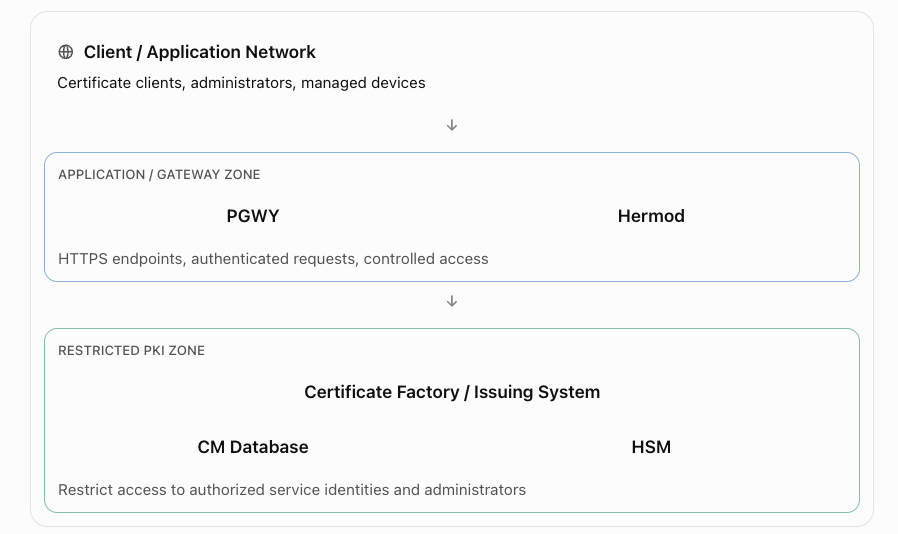
A production architecture should separate externally accessible enrollment and authentication endpoints from the protected PKI core.
Client / Application Network
Certificate clients, administrators, managed devices
APPLICATION / GATEWAY ZONE
PGWY
Hermod
HTTPS endpoints, authenticated requests, controlled access
RESTRICTED PKI ZONE
Certificate Factory / Issuing System
CM Database
HSM
Restrict access to authorized service identities and administrators
This is a recommended logical security layout, not a mandatory vendor deployment topology.
9.2 High availability considerations
For business-critical PKI, availability must cover more than the web frontend.
Nexus supports active-active configurations for the Certificate Factory and Certificate Issuing System. Such deployments require compatible configurations and access to the correct CA keys. Nexus Documentation
A production design should consider:
- Redundant instances for supported stateless or scalable services.
- Resilient database storage and tested recovery procedures.
- HSM availability and protected key backup procedures.
- Reliable DNS, load balancing, and TLS termination.
- Secure connectivity between gateway and PKI services.
- Recoverable Hermod messaging state.
- Clear monitoring of dependencies across services.
Avoid assuming that increasing Kubernetes replica counts automatically makes a CA highly available. Signing-key access, database consistency, and product-supported clustering are critical.
10. Security best practices
PKI infrastructure is especially sensitive because it establishes digital trust for other systems.
| Security area | Recommended practice |
|---|---|
| CA signing keys | Use supported HSM-backed protection for production |
| Network access | Keep CF, CIS, database, and HSM interfaces restricted |
| Transport encryption | Use properly validated TLS between components |
| Administrative access | Enforce officer roles and least privilege |
| Enrollment authorization | Validate requester identities, allowed names, and certificate policies |
| Secrets | Protect API keys, tokens, client credentials, and certificate private keys |
| Logging | Never log authentication secrets or private-key material |
| Certificate validity | Prefer short, appropriate validity periods with reliable renewal automation |
| Revocation | Ensure CRL or OCSP mechanisms are available where required |
| Auditing | Retain protected records of certificate administration and issuance |
| Disaster recovery | Test recovery of database, configuration, and protected key infrastructure |
Two product-specific details are worth noting.
First, Nexus documents a four-eye principle for sensitive CA policy changes, in which two authorized security officers sign policy changes. Nexus Documentation
Second, the CM REST API is not simply an unrestricted HTTP interface. Nexus documents TLS client-certificate authentication and officer-certificate signing for API requests. Nexus Documentation
11. Monitoring and observability
For an SRE or DevOps team, the most valuable monitoring questions are:
- Can applications obtain new certificates?
- Can administrators authenticate?
- Are certificates being renewed before expiry?
- Are the signing services and underlying dependencies healthy?
- Can certificates be revoked and can relying parties obtain current revocation information?
Suggested operational metrics
| Component | Monitor | Example alert condition |
|---|---|---|
| CM | Certificate issuance failures | Failures exceed normal baseline |
| CM | Certificate expiration | Important managed certificate expires soon |
| CM | Database availability | CM cannot access its database |
| CM | HSM connectivity | Signing operations fail or become unavailable |
| PGWY | Enrollment request failures | Elevated ACME/SCEP/EST errors |
| PGWY | API latency | Significant increase in request duration |
| PGWY | Backend connectivity | Gateway cannot reach CF |
| Hermod | Authentication failures | Sudden increase in failed operations |
| Hermod | Callback delivery | Callbacks fail or time out |
| Hermod | API authentication | Repeated unexpected authentication failures |
| All | TLS certificate validity | Service certificate approaching expiry |
| All | Resource utilization | Sustained resource saturation |
These are recommended monitoring signals, not claims that every metric exists as a built-in exporter.
Nexus documents operational logs, signed audit logs, ping-based checks, SNMP, syslog, and metrics among its supported monitoring interfaces. Nexus Documentation
An enterprise can integrate available telemetry into Datadog, Prometheus, or another observability system through supported collectors or integration methods.
12. Troubleshooting common problems
The key to troubleshooting is to identify which workflow is failing: certificate enrollment, PKI core processing, or authentication.
| Problem | Possible cause | What to investigate |
|---|---|---|
| PGWY endpoint unavailable | Tomcat, TLS, routing, DNS | Gateway service and endpoint health |
| ACME request rejected | Account authorization, challenge failure, policy mismatch | ACME logs and challenge validation |
| SCEP enrollment fails | Missing registration or invalid challenge | CM device registration and PGWY SCEP configuration |
| EST renewal fails | Authentication or subject mismatch | Client certificate, subject identity, EST handler |
| CM cannot issue certificates | CF/CIS connectivity, database, HSM, policy | Core service health and audit records |
| CM Web UI login fails | Hermod, Personal Desktop, officer authorization | Authentication workflow and callbacks |
| Hermod returns HTTP 403 | Invalid client API key or authorization | Registered API client credentials |
| Hermod callback fails | Incorrect callback URL, TLS trust, network restriction | Callback reachability and service logs |
| Certificate issued but TLS fails | Missing CA trust, wrong SAN, wrong certificate/key | TLS chain and application configuration |
| Renewal fails after a previous success | Changed account, domain, policy, or credential | Enrollment history and current policy |
Nexus’s Hermod API-key guide specifically documents HTTP 403 responses for incorrect API keys in its test flow. Nexus Documentation
Example troubleshooting workflow: CM Web UI login failure
Start with the first component in the sign-in path and progress inward.
- Verify that CM Web UI is reachable.
- Verify PGWY is responding and its REST integration is enabled.
- Verify PGWY can connect securely to Hermod.
- Check the Hermod API client configuration and authentication credentials.
- Verify that Personal Desktop Client is installed and functioning.
- Check that the officer’s certificate is present and usable.
- Verify Hermod callback connectivity to PGWY.
- Check officer authorization and certificate trust with CM.
- Correlate timestamps and request identifiers across the components.
- Retry with a known-good test officer account after correcting the identified failure.
A key detail from the latest 8.15 Web UI installation guidance is that the PGWY virtual registration officer should have only the required privileges. Giving it additional roles may interfere with the effective permissions of the authenticated Web UI officer. Nexus Documentation
13. Practical learning exercises
The following exercises are useful for understanding and validating the architecture in an authorized test environment. They are high-level lab workflows rather than version-specific installation instructions.
Lab 1 — Issue and revoke a test certificate through Nexus CM
Objective: Understand how a CA handles certificate issuance and revocation.
Prerequisites: A functioning nonproduction CM installation, a configured test CA, and an authorized officer account.
Procedure:
- Sign in to the supported CM administration interface.
- Identify the test issuing CA.
- Review the available certificate procedures and permitted usages.
- Create a test certificate request with a nonproduction key pair.
- Submit the request through the permitted enrollment interface.
- Verify that a certificate was issued.
- Inspect its subject, SAN, issuer, validity, and public-key information.
- Confirm the certificate exists in CM’s certificate inventory.
- Revoke the test certificate using an authorized officer.
- Verify the new revocation status through the configured publication and validation mechanism.
Expected outcome: The certificate progresses from issuance to a revoked state, with an auditable history.
Lab 2 — Understand certificate enrollment through PGWY
Objective: Observe an automated certificate enrollment workflow.
Prerequisites: A configured ACME endpoint in a test PGWY deployment, an authorized ACME account, and a test domain.
Procedure:
- Review the ACME configuration and allowed domain policies.
- Confirm the gateway’s directory endpoint is reachable and trusted by the test client.
- Register or configure the authorized ACME account.
- Create a certificate order for the test hostname.
- Satisfy the configured ACME challenge.
- Observe the certificate request processing.
- Confirm the certificate is issued by the expected CA.
- Install the certificate in a test web service.
- Validate its TLS connection and trust chain.
- Test automated renewal before the certificate expires.
Expected outcome: A test application obtains and renews its TLS certificate without manual issuance for each renewal.
Lab 3 — Verify administrator authentication through Hermod
Objective: Understand and validate the CM officer authentication flow.
Prerequisites: CM Web UI, PGWY, Hermod, Personal Desktop Client, and a test officer credential configured for the selected product versions.
Procedure:
- Verify Hermod health and database connectivity.
- Confirm the PGWY integration client exists in Hermod.
- Check callback URL and certificate trust configuration.
- Open CM Web UI.
- Initiate officer sign-in.
- Observe the Personal Desktop launch.
- Complete the cryptographic authentication.
- Confirm that Hermod processes and returns the result.
- Verify that PGWY accepts the response and CM authorizes the officer.
- Confirm the officer can access only permitted functions.
Expected outcome: The officer authenticates successfully, and authorization remains enforced by the PKI platform.
14. How Nexus compares with cloud-native certificate tools
For teams using AWS and Kubernetes, these distinctions are useful.
| Technology | Primary responsibility |
|---|---|
| Nexus Certificate Manager | Enterprise CA, PKI policy, certificate lifecycle |
| Nexus PGWY | Standard certificate enrollment interface |
| Nexus Hermod | User/client authentication and signing orchestration |
| AWS Certificate Manager (ACM) | Management and provisioning of certificates for supported AWS services |
| AWS Private CA | Managed private Certificate Authority service |
| Kubernetes cert-manager | Automates certificate requests and renewals inside Kubernetes |
The Kubernetes cert-manager project is not the same product as Nexus Certificate Manager.
A possible enterprise architecture is:
Kubernetes cert-manager → ACME → Nexus PGWY → Nexus CM
In this arrangement, cert-manager acts as the enrollment client/controller, PGWY exposes the ACME interface, and CM provides the CA functionality.
This should be treated as an integration design to validate, not a guarantee of compatibility for every combination of releases, CA policies, DNS challenges, and ACME account configurations.
Hermod would not ordinarily be involved in that automated certificate request.
15. Frequently asked questions
Q1. Can Certificate Manager work without Protocol Gateway?
Yes, for supported direct CM clients and interfaces. However, PGWY is required when using the enrollment interfaces implemented through PGWY.
Q2. Can PGWY issue a certificate independently?
No. PGWY handles protocol and enrollment operations; certificate issuance is performed by the CM infrastructure.
Q3. Is Hermod required for all certificates?
No. Hermod is involved in supported authentication, signing, and messaging workflows. Standard automated certificate enrollment typically does not require it.
Q4. Can Hermod replace a Certificate Authority?
No. Hermod does not replace the CA. It coordinates authentication and signing workflows using supported credentials and clients.
Q5. Does installing a certificate automatically make an application secure?
No. Applications must validate certificate chains and identities correctly, protect private keys, configure TLS appropriately, and enforce authorization.
Q6. Are these components only useful for employee certificates?
No. They can support infrastructure, device, IoT, network, manufacturing, and other enterprise PKI use cases.
Q7. What happens when a certificate is revoked?
CM records and publishes revocation information according to its configuration. Relying parties must actually check and enforce appropriate revocation status for the revocation to affect trust decisions.
16. Quick reference summary
| Question | Nexus CM | Nexus PGWY | Hermod |
|---|---|---|---|
| What is it? | Enterprise PKI platform | Certificate enrollment gateway | Authentication/signing messaging service |
| Main responsibility | Certificate authority and lifecycle | Enrollment interfaces | Authentication and signing workflows |
| Typical users | PKI officers and infrastructure systems | Servers, devices, enrollment clients | Authentication applications and supported credential clients |
| Key technologies | X.509, PKI, CA, HSM, CRL | ACME, SCEP, EST, CMP, REST | REST, API keys, callbacks, plugout |
| Can issue CA-signed certificates? | Yes | Through CM | No |
| Can manage certificate revocation? | Yes | Through supported CM interfaces | Not its primary purpose |
| Used for CM Web UI sign-in? | Authorizes officer access | Coordinates the integration | Handles authentication workflow |
The architecture in one sentence
Nexus CM establishes and manages digital trust; Nexus PGWY makes that trust accessible through certificate enrollment protocols; and Hermod enables secure authentication and signing workflows using supported digital credentials.
17. Official documentation and further reading
These are the most useful primary references for learning and implementation.
CA capabilities, certificate lifecycle, HSM, policies, and use cases
Enrollment gateway architecture and interfaces
Automated certificate request lifecycle
Secure messaging, API authentication, and callbacks
CM Web UI installation and Hermod integration
Prerequisites, officer authentication, and deployment configuration
Hermod installation and deployment
Container, WAR, and Kubernetes deployment guides
For production deployment, always use the documentation corresponding to the exact installed CM, PGWY, Web UI, and Hermod versions. In particular, supported Java/Tomcat combinations, authentication configuration, and available enrollment protocols should be checked against the release and license being deployed.