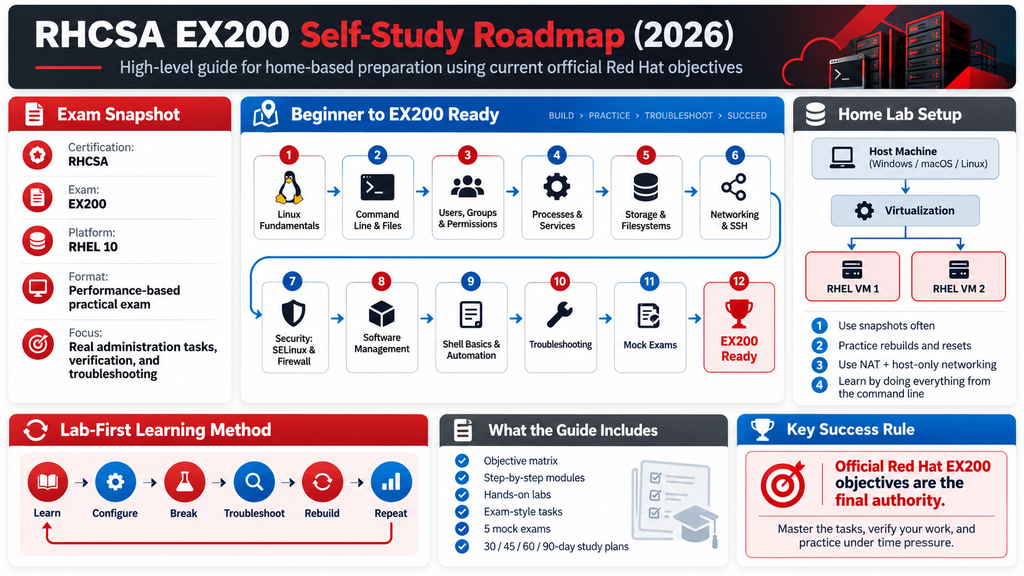
Target: Current Red Hat Certified System Administrator (RHCSA) / EX200
Platform: Red Hat Enterprise Linux 10
Study model: 100% self-study + hands-on labs
Primary authority: Current Red Hat EX200 objectives and RHEL 10 documentation
I have treated the uploaded specification as the curriculum requirements. Pasted text
Important: This guide is a preparation curriculum, not an official Red Hat course or a reproduction of the EX200 exam. The current Red Hat EX200 page is the final authority if Red Hat changes an objective, platform version, policy, or exam procedure.
1. RHCSA and EX200: What Are You Actually Preparing For?
1.1 What is RHCSA?
RHCSA stands for Red Hat Certified System Administrator.
It is a Red Hat certification validating practical system-administration skills across Red Hat environments.
The current EX200 page describes the certification as validating system-administration skills common across a wide range of environments and deployment scenarios. The current exam is based on RHEL 10. Red Hat
RHCSA-level work includes things such as:
- Managing users and groups
- Managing files and permissions
- Managing packages
- Managing services
- Managing storage
- Configuring networking
- Managing SELinux
- Configuring firewalld
- Troubleshooting systems
- Working with the command line
- Writing simple shell scripts
- Managing system boot and services
What RHCSA does NOT mean
RHCSA does not certify that someone is:
- An advanced Linux kernel developer
- A Kubernetes administrator
- An Ansible expert
- An enterprise architect
- A database administrator
- A security engineer
- A network engineer
Those are different skill areas.
2. What Is EX200?
EX200 is the:
Red Hat Certified System Administrator (RHCSA) exam
It is a performance-based, hands-on examination.
The current exam is based on Red Hat Enterprise Linux 10. Red Hat
The candidate is expected to perform administrative tasks rather than simply answer theoretical questions.
Red Hat explicitly says candidates should be able to accomplish the listed tasks without assistance. Red Hat
The current exam page also states that internet access is not provided during the exam and that candidates cannot bring notes, books, or electronic documentation. Red Hat
Exam duration
Not officially specified in the current EX200 page retrieved for this guide.
Older Red Hat material contains different durations, so those figures should not be presented as the current EX200 duration without current official confirmation.
Not officially specified in the current Red Hat documentation.
3. EX200 Prerequisites
Red Hat currently lists the following preparation routes:
- RH124 + RH134
- RH199 Rapid Track
- Comparable work experience as a RHEL system administrator
These are listed as preparation/prerequisite guidance for the exam. Red Hat
However, completing a Red Hat course is not equivalent to earning RHCSA.
The relationship is:
Self-study
   +
Hands-on practice
   +
EX200
   ↓
RHCSA
Training is preparation.
EX200 is the assessment.
RHCSA is the resulting certification.
4. The Current Official EX200 Objective Map
This is the most important part of the curriculum.
The current Red Hat EX200 page groups the objectives into these areas:
- Understand and use essential tools
- Manage software
- Create simple shell scripts
- Operate running systems
- Configure local storage
- Create and configure file systems
- Deploy, configure, and maintain systems
- Manage basic networking
- Manage users and groups
- Manage security
These are the current official objective areas, not an older RHCSA syllabus. Red Hat
5. Official Objective Matrix
| # | Current official area | Major skills |
|---|---|---|
| 1 | Essential tools | Shell, redirection, grep, SSH, files, links, permissions, documentation |
| 2 | Software | RPM repositories, RPM packages, Flatpak |
| 3 | Shell scripts | Conditions, loops, arguments, command output |
| 4 | Running systems | Boot, targets, processes, scheduling, tuning, logs, services, file transfer |
| 5 | Local storage | GPT partitions, PV, VG, LV, persistent storage, swap |
| 6 | File systems | VFAT, ext4, XFS, NFS, autofs, LVM extension, permissions |
| 7 | Deploy/configure/maintain | Scheduling, services, targets, time, packages, bootloader |
| 8 | Networking | IPv4, IPv6, hostname resolution, services, firewalld |
| 9 | Users/groups | Accounts, passwords, aging, groups, privileged access |
| 10 | Security | firewalld, permissions, SSH keys, SELinux |
These objectives are directly derived from the current EX200 page. Red Hat
6. Curriculum Architecture
Use this learning sequence:
Linux Fundamentals
       ↓
RHEL Command Line
       ↓
Files & Permissions
       ↓
Users & Groups
       ↓
Processes
       ↓
systemd & Services
       ↓
Software Management
       ↓
Storage & Filesystems
       ↓
Networking
       ↓
SSH
       ↓
Firewall
       ↓
SELinux
       ↓
Scheduling & Time
       ↓
Boot & Troubleshooting
       ↓
Shell Scripting
       ↓
Integrated Troubleshooting
       ↓
Exam Labs
       ↓
Mock Exams
       ↓
EX200 Ready
The order is a study recommendation, not an official Red Hat sequence.
7. Home Laboratory
7.1 Recommended topology
For serious preparation, use at least two RHEL 10 VMs.
                 HOME COMPUTER
                       |
             ┌─────────┴─────────┐
             │                   │
         RHEL10-01           RHEL10-02
         server01             server02
             │                   │
             └─────────┬─────────┘
                       │
                Practice Network
A third VM is useful but not mandatory.
RHEL10-01
   |
RHEL10-02
   |
RHEL10-03
The two-node design is particularly useful for:
- SSH
- NFS
- Networking
- Remote administration
- File transfer
- Troubleshooting
- Client/server exercises
8. Getting RHEL for the Home Lab
Red Hat currently provides a no-cost RHEL Individual Developer Subscription.
Red Hat’s current Customer Portal guidance says individuals registering through the Red Hat Developer Portal can obtain the no-cost RHEL Developer Subscription for Individuals. Red Hat specifically lists VirtualBox, VMware, Microsoft Hyper-V, and KVM/libvirt as possible VM platforms. Red Hat Customer Portal
Therefore:
Windows
Possible options include:
- Hyper-V
- VMware
- VirtualBox
Linux
Recommended:
- KVM/libvirt
macOS
Use a supported virtualization solution capable of running the appropriate RHEL architecture.
Red Hat’s current subscription guidance specifically names VirtualBox, VMware, Hyper-V and KVM/libvirt; it does not establish UTM as an official RHEL Developer Subscription requirement.
Therefore:
UTM as an EX200 lab platform: Not officially specified in the current Red Hat documentation.
9. Suggested VM Resources
These are lab recommendations, not Red Hat EX200 minimum requirements.
For comfortable practice:
Per VM:

CPU:      2 vCPU
RAM:      4 GB
Disk:     30–40 GB
Network:  1–2 virtual NICs
For three VMs:
3 × 2 vCPU
3 × 4 GB RAM
3 × 30–40 GB disk
You can reduce resources if the host cannot provide them.
10. Networking Design
Use:
                    Internet
                       |
                      NAT
                       |
                Host computer
                       |
              Private lab network
                 /           \
                /             \
        server01             server02
        192.168.50.11       192.168.50.12
Use NAT for Internet/package access and a private network for inter-VM exercises.
Do not depend on Internet connectivity for learning core EX200 tasks.
11. Lab Rule: Learn → Break → Fix
The curriculum should follow:
LEARN
  ↓
CONFIGURE
  ↓
VERIFY
  ↓
BREAK
  ↓
TROUBLESHOOT
  ↓
FIX
  ↓
VERIFY AGAIN
  ↓
REBUILD
This is much more valuable for EX200 preparation than reading commands repeatedly.
12. Module 1 — Essential Command-Line Skills
Learning objectives
You should be able to:
- Open a shell
- Execute commands
- Understand command syntax
- Redirect output
- Pipe commands
- Search text
- Connect using SSH
- Switch users
- Manipulate files
- Create links
- Manage permissions
- Find documentation
These are directly represented in the current EX200 objectives. Red Hat
Core commands
| Command | Purpose |
|---|---|
pwd | Current directory |
ls | List files |
cd | Change directory |
mkdir | Create directory |
touch | Create file |
cp | Copy |
mv | Move/rename |
rm | Remove |
cat | Display file |
less | Read file |
head | Beginning of file |
tail | End of file |
grep | Search text |
find | Find filesystem objects |
ln | Create links |
chmod | Change permissions |
chown | Change ownership |
man | Manual |
info | Info documentation |
ssh | Remote login |
scp | Secure file transfer |
Lab 1 — File management
mkdir -p ~/rhcsa/lab1
cd ~/rhcsa/lab1

touch file1 file2 file3
mkdir data logs

cp file1 data/
mv file2 logs/

ls -l
Verify
find ~/rhcsa/lab1 -type f13. Input and Output Redirection
You must understand:
>
>>
|
2>
2>&1
Examples:
ls > files.txtls >> files.txtgrep root /etc/passwdgrep root /etc/passwd > result.txtgrep root /etc/passwd 2> errors.txtPipe:
ps aux | grep ssh14. Text Processing
The current objective explicitly includes grep and regular expressions. Red Hat
Practice:
grep root /etc/passwd
grep '^root' /etc/passwd
grep 'bash$' /etc/passwd
grep -i error logfile
You should understand:
^       beginning
$       end
.       any character
*       zero or more
[]      character class
Lab
Find:
- Users using
/bin/bash - Lines beginning with
root - Lines containing
nologin
15. Module 2 — Files, Links and Permissions
File types
Know:
-   regular file
d   directory
l   symbolic link
Use:
ls -lHard links
ln file1 hardlinkVerify:
ls -li file1 hardlinkThe inode should be the same.
Symbolic links
ln -s file1 symlinkVerify:
ls -l symlink16. Permissions
Understand:
user
group
other
Example:
-rwxr-x---Equivalent:
750Change:
chmod 750 script.shOwnership:
chown raj:developers file17. Permission Lab
Create:
mkdir /tmp/permission-lab
touch /tmp/permission-lab/test
Set:
chmod 640 /tmp/permission-lab/testVerify:
ls -l /tmp/permission-lab/testThen intentionally make the file inaccessible to another user.
Switch user:
su - testuserAttempt access.
Diagnose.
18. Module 3 — Users and Groups
Current EX200 explicitly requires local user and group administration. Red Hat
Core commands:
useradd
usermod
userdel
passwd
groupadd
groupmod
groupdel
id
groups
Examples:
useradd alice
passwd alice
Create group:
groupadd developersAdd user:
usermod -aG developers aliceVerify:
id alice19. Password Aging
Practice:
chage -l aliceSet password expiration:
chage -M 90 aliceSet minimum age:
chage -m 1 aliceSet warning period:
chage -W 7 alice20. Privileged Access
Understand sudo and the relevant configuration mechanism.
Practice safely with:
visudoDo not casually edit /etc/sudoers with a normal editor.
Lab
Create:
operatorGive the account controlled administrative privileges.
Verify:
sudo -l -U operator21. Module 4 — Processes
Current EX200 requires identifying CPU/memory-intensive processes, killing processes and adjusting scheduling. Red Hat
Important commands:
ps
top
pgrep
pkill
kill
killall
nice
renice
Examples:
ps auxtoppgrep sshdkill PIDrenice 10 -p PID22. Process Lab
Start a long-running process:
sleep 1000 &Find it:
pgrep sleepInspect:
ps -fp $(pgrep sleep)Terminate:
kill $(pgrep sleep)Verify:
pgrep sleep23. Module 5 — systemd and Services
Understand:
systemd
  ↓
units
  ↓
services
  ↓
targets
Commands:
systemctl status sshd
systemctl start sshd
systemctl stop sshd
systemctl restart sshd
systemctl enable sshd
systemctl disable sshd
Verify:
systemctl is-enabled sshd
systemctl is-active sshd
24. Service Troubleshooting
When a service fails:
systemctl status SERVICEThen:
journalctl -u SERVICEThen inspect:
ss -lntupAnd:
ps auxThe troubleshooting model is:
Service failed
     ↓
systemctl status
     ↓
journalctl
     ↓
configuration
     ↓
dependencies
     ↓
ports
     ↓
SELinux
     ↓
firewall
     ↓
fix
     ↓
verify
25. Module 6 — Logs and Journals
Current EX200 explicitly includes locating and interpreting system logs and journals and preserving system journals. Red Hat
Core commands:
journalctl
journalctl -b
journalctl -u sshd
journalctl -p err
journalctl --since "1 hour ago"
Useful files:
/var/log/
/var/log/messages
/var/log/secure
/var/log/audit/audit.log
Exact log locations can vary by service and configuration.
26. Module 7 — Software Management
The current EX200 objectives include:
- RPM repositories
- RPM packages
- Flatpak repositories
- Flatpak packages Red Hat
RPM
rpm -q PACKAGE
rpm -qa
rpm -qi PACKAGE
rpm -ql PACKAGE
rpm -qf /path/to/file
DNF
dnf search PACKAGE
dnf info PACKAGE
dnf install PACKAGE
dnf remove PACKAGE
dnf update
27. Repository Lab
Inspect:
dnf repolistFind a package:
dnf search nginxInstall:
dnf install nginxVerify:
rpm -q nginxRemove:
dnf remove nginx28. Flatpak
The current EX200 objective explicitly includes configuring access to Flatpak repositories and installing/removing Flatpak software. Red Hat
Do not omit this simply because older RHCSA material may not have emphasized it.
Practice the current RHEL 10 Flatpak workflow from the official RHEL documentation.
Exact commands/repository configuration should be taken from the current RHEL 10 documentation applicable to the installed environment rather than copied from an older RHCSA guide.
29. Module 8 — Storage
This is one of the highest-value practical areas.
Current objectives include:
- GPT partitions
- Physical volumes
- Volume groups
- Logical volumes
- Persistent mounts
- UUID/labels
- Adding storage
- Swap
- Extending logical volumes Red Hat
30. Storage Architecture
Understand:
Physical Disk
     ↓
Partition
     ↓
Physical Volume
     ↓
Volume Group
     ↓
Logical Volume
     ↓
Filesystem
     ↓
Mount Point
31. Important Commands
lsblk
blkid
fdisk
parted
pvcreate
pvs
vgcreate
vgs
lvcreate
lvs
lvextend
mkfs.xfs
mkfs.ext4
mount
umount
findmnt
df
du
32. LVM Lab
Assume an additional disk /dev/sdb.
Inspect:
lsblkCreate PV:
pvcreate /dev/sdbCreate VG:
vgcreate vgdata /dev/sdbCreate LV:
lvcreate -L 2G -n lvdata vgdataCreate filesystem:
mkfs.xfs /dev/vgdata/lvdataMount:
mkdir /data
mount /dev/vgdata/lvdata /data
Verify:
df -h /data33. Persistent Mount
Get UUID:
blkid /dev/vgdata/lvdataAdd an appropriate entry to:
/etc/fstabTest before rebooting:
mount -aThen:
findmnt /dataReboot.
Verify again.
This is critical because Red Hat explicitly states that configurations on the performance-based exam must persist after reboot without intervention. Red Hat
34. Filesystems
Current EX200 specifically names:
- VFAT
- ext4
- XFS
- NFS
- autofs Red Hat
Practice:
mkfs.xfs
mkfs.ext4
mkfs.vfat
Mount:
mount
umount
Inspect:
findmnt
lsblk
blkid
df -h
35. NFS Lab
Two machines:
server01
   |
NFS export
   |
server02
   |
NFS mount
On the server, configure an export using the current RHEL 10 NFS documentation.
On the client:
mount SERVER:/export/path /mnt/nfsVerify:
findmnt /mnt/nfsThen test persistence and troubleshooting.
36. autofs
You should understand:
Client
  ↓
autofs
  ↓
mount requested path
  ↓
NFS/filesystem mounted automatically
Practice:
- Configure automount
- Access mount point
- Confirm automatic mounting
- Stop NFS service
- Observe failure
- Restore service
- Verify recovery
37. Swap
Inspect:
swapon --show
free -h
Create swap using an appropriate disk/partition/LVM method.
Enable:
swaponVerify:
swapon --showConfigure persistence.
Reboot.
Verify again.
38. Module 9 — Networking
Current EX200 networking objectives include:
- IPv4
- IPv6
- Hostname resolution
- Network services
- Automatic startup
- firewalld Red Hat
RHEL 10 uses NetworkManager.
Useful commands:
nmcli
ip
ss
ping
hostname
hostnamectl
39. nmcli
Inspect:
nmcli device status
nmcli connection show
Inspect a connection:
nmcli connection show "CONNECTION"Configure an IPv4 address:
nmcli connection modify "CONNECTION" \
  ipv4.addresses 192.168.50.11/24
Configure gateway:
nmcli connection modify "CONNECTION" \
  ipv4.gateway 192.168.50.1
Configure DNS:
nmcli connection modify "CONNECTION" \
  ipv4.dns 192.168.50.1
Activate:
nmcli connection up "CONNECTION"Verify:
ip addr
ip route
40. IPv6
Do not study only IPv4.
Current EX200 explicitly includes IPv4 and IPv6 configuration. Red Hat
Practice:
ip -6 addr
ip -6 route
Configure IPv6 through NetworkManager and verify persistence.
41. Hostname Resolution
Understand:
Application
    ↓
Name resolution
    ↓
DNS / local configuration
Inspect:
hostnamectl
getent hosts example.com
Know the relevant local resolver configuration used by current RHEL 10.
Do not blindly memorize an old RHEL version’s resolver architecture.
42. SSH
Current EX200 requires remote access using SSH and key-based authentication. Red Hat
Generate key:
ssh-keygenCopy key:
ssh-copy-id user@server02Test:
ssh user@server02Transfer:
scp file user@server02:/tmp/43. SSH Key Lab
server01
   |
   | SSH key
   ↓
server02
Requirements:
- Generate key
- Install public key
- Log in without password
- Transfer a file
- Break permissions
- Troubleshoot
- Restore
Useful troubleshooting:
ssh -v user@server0244. Module 10 — firewalld
Current EX200 explicitly requires firewall configuration with firewall-cmd/firewalld. Red Hat
Inspect:
firewall-cmd --state
firewall-cmd --get-active-zones
firewall-cmd --get-services
Inspect zone:
firewall-cmd --zone=public --list-allAdd service:
firewall-cmd --permanent --zone=public --add-service=httpReload:
firewall-cmd --reloadVerify:
firewall-cmd --zone=public --list-services45. Firewall Troubleshooting Lab
Create this scenario:
Client
  ↓
HTTP request
  ↓
Server
  ↓
Service running
  ↓
Firewall blocks port
Troubleshooting sequence:
systemctl status httpd
ss -lntp
firewall-cmd --list-all
Fix the firewall.
Test again.
Then reboot and verify persistence.
46. Module 11 — SELinux
SELinux is a core current EX200 objective.
The current exam explicitly includes:
- Enforcing/permissive modes
- File and process contexts
- Restoring contexts
- SELinux port labels
- Boolean settings Red Hat
RHEL 10 documentation describes SELinux as a Mandatory Access Control mechanism that controls how processes interact with files and network resources. Red Hat Documentation
47. SELinux Modes
getenforceModes:
Enforcing
Permissive
Disabled
Temporarily change:
setenforce 0or:
setenforce 1Persistent configuration should be handled using the current RHEL 10 mechanism.
48. SELinux Contexts
Inspect:
ls -ZProcess contexts:
ps -eZRestore default context:
restorecon -Rv /pathRed Hat’s RHEL 10 documentation specifically identifies file labeling and SELinux administration as core SELinux functionality. Red Hat Documentation
49. SELinux Lab
Create a web directory:
mkdir /webdataCreate content:
echo "RHCSA LAB" > /webdata/index.htmlIntentionally configure an incorrect SELinux context.
Observe:
ls -Z /webdata/index.htmlRestore:
restorecon -Rv /webdataVerify.
50. SELinux Ports
Understand the difference between:
Firewall permission
        ≠
SELinux permission
Inspect ports:
semanage port -lAdd an appropriate SELinux port label when required.
Verify.
51. SELinux Booleans
List:
getsebool -aSearch:
getsebool -a | grep httpdSet:
setsebool BOOLEAN onPersist:
setsebool -P BOOLEAN onUnderstand what the boolean controls rather than memorizing random values.
52. SELinux Troubleshooting
The correct mindset:
Application fails
      ↓
Check DAC permissions
      ↓
Check SELinux context
      ↓
Check AVC denial
      ↓
Identify cause
      ↓
Fix context / boolean / port
      ↓
Verify
Useful tools include:
ausearch
journalctl
sealert
ls -Z
ps -eZ
semanage
restorecon
The exact availability of auxiliary tools depends on installed packages.
53. Module 12 — Boot Process
Current EX200 objectives include:
- Normal boot/reboot/shutdown
- Booting different targets
- Interrupting boot
- Bootloader modification Red Hat
Understand:
Firmware
   ↓
Bootloader
   ↓
Kernel
   ↓
systemd
   ↓
Target
   ↓
Services
54. Boot Target Lab
Inspect:
systemctl get-defaultList targets:
systemctl list-units --type=targetChange default target using the appropriate systemctl mechanism.
Verify.
Reboot.
Confirm.
55. Boot Troubleshooting
You should be able to reason through:
System does not boot correctly
        ↓
Bootloader?
        ↓
Kernel?
        ↓
initramfs?
        ↓
systemd?
        ↓
target?
        ↓
failed service?
        ↓
filesystem?
Do not memorize one magical command.
Learn the diagnostic process.
56. Module 13 — Scheduling
Current EX200 explicitly includes:
at- cron
- systemd timer units Red Hat
Understand:
at
  → one-time job

cron
  → recurring job

systemd timer
  → systemd-managed scheduled task
57. Cron Lab
Create a test job that writes:
RHCSA cron testto a file.
Verify:
crontab -lCheck execution.
Troubleshoot:
- Wrong schedule
- Wrong path
- Environment differences
- Permissions
- Service state
58. systemd Timer Lab
Create:
test-job.service
test-job.timer
Enable timer.
Verify:
systemctl list-timersInspect:
systemctl status test-job.timer59. Module 14 — Time Synchronization
Current EX200 requires configuring time-service clients. Red Hat
RHEL 10 documentation covers time synchronization using chrony.
Know:
timedatectl
chronyc
Inspect:
timedatectl
chronyc sources
chronyc tracking
Understand:
system clock
    ↓
chronyd
    ↓
configured time source
60. Module 15 — Shell Scripting
Current EX200 explicitly requires simple shell scripts, not advanced Bash programming. Red Hat
You need:
- Variables
- Conditions
- Loops
- Positional arguments
- Command substitution
- Command output
61. Script 1 — Variables
#!/bin/bash

NAME="RHCSA"
echo "Preparing for $NAME"
62. Script 2 — Arguments
#!/bin/bash

echo "First argument: $1"
echo "Second argument: $2"
Run:
./script.sh Linux Admin63. Script 3 — Condition
#!/bin/bash

if [ -f "$1" ]; then
    echo "File exists"
else
    echo "File does not exist"
fi
64. Script 4 — Loop
#!/bin/bash

for file in "$@"; do
    echo "Processing: $file"
done
65. Script 5 — Command Substitution
#!/bin/bash

HOST=$(hostname)

echo "This system is $HOST"
66. Shell-Scripting Completion Standard
You are ready when you can write, without notes:
1. Argument-based script
2. if/else script
3. for loop
4. File-processing script
5. Script that captures command output
Do not spend weeks studying advanced Bash features that are outside the current EX200 objective.
67. Module 16 — File Transfer
Current EX200 includes secure file transfer. Red Hat
Practice:
scp
sftp
ssh
Example:
scp report.txt user@server02:/tmp/Verify remotely:
ssh user@server02 'ls -l /tmp/report.txt'68. Module 17 — Tuning
Current EX200 includes managing tuning profiles. Red Hat
Understand:
tuned
   ↓
profiles
   ↓
system optimization
Practice:
tuned-adm active
tuned-adm list
Select an appropriate profile in the lab.
Verify.
69. Module 18 — File Permission Troubleshooting
Create a failure:
User cannot read fileDo not immediately run chmod 777.
Use:
ls -l
id user
namei -l /path/to/file
Check:
- User
- Group
- Parent directories
- File permissions
- ACLs if applicable
- SELinux context
Then fix the smallest necessary permission.
70. Troubleshooting Framework
Every troubleshooting problem should follow:
1. Reproduce
2. Observe
3. Collect evidence
4. Identify layer
5. Change one thing
6. Test
7. Verify
8. Make persistent
9. Reboot-test when appropriate
71. Troubleshooting Scenario 1 — Service Won’t Start
Problem
httpd fails to startInvestigate
systemctl status httpd
journalctl -u httpd
Check configuration:
httpd -tCheck port:
ss -lntpCheck SELinux.
Check firewall.
Verify
systemctl is-active httpd72. Scenario 2 — SSH Failure
Investigate:
systemctl status sshd
ss -lntp | grep :22
Client:
ssh -v user@serverCheck:
firewall-cmd --list-allThen:
- DNS/hostname
- IP connectivity
- User
- Permissions
- SSH key
- SELinux where relevant
73. Scenario 3 — Filesystem Won’t Mount
Check:
lsblk
blkid
findmnt
cat /etc/fstab
Test:
mount -aCheck:
journalctl -bCommon causes:
- Wrong UUID
- Wrong filesystem type
- Missing directory
- Invalid mount option
- Storage unavailable
74. Scenario 4 — Disk Full
Start:
df -hThen:
du -xhd1 /Look for:
- Full filesystem
- Large directory
- Deleted-but-open files
- Logs
This becomes an integrated troubleshooting exercise.
75. Scenario 5 — Network Failure
Check:
ip addr
ip route
nmcli device status
nmcli connection show
Then:
ping gatewayThen:
getent hosts hostnameDistinguish:
Link problem
   ≠
IP problem
   ≠
Routing problem
   ≠
DNS problem
   ≠
Firewall problem
76. Scenario 6 — SELinux Denial
Application fails
      ↓
Check service
      ↓
Check permissions
      ↓
Check context
      ↓
Check audit messages
      ↓
Identify denial
      ↓
Correct policy/context
Useful:
ausearch -m AVC -ts recent77. Scenario 7 — Package Installation Failure
Investigate:
dnf repolist
dnf info PACKAGE
Check:
- Repository enabled?
- DNS working?
- Network working?
- Package available?
- Dependency problem?
- Subscription/repository configuration?
Do not randomly install packages from third-party repositories.
78. Scenario 8 — systemd Dependency Problem
Use:
systemctl status SERVICE
systemctl list-dependencies SERVICE
journalctl -u SERVICE
Understand:
Requires
Wants
After
Before
Only go deeper than this when the actual current objective requires it.
79. Command Mastery List
This is a focused EX200 list, not an attempt to document every Linux command.
Files
pwd
ls
cd
mkdir
touch
cp
mv
rm
find
file
stat
Text
cat
less
head
tail
grep
Links
lnPermissions
chmod
chown
chgrp
umask
Users
useradd
usermod
userdel
passwd
chage
id
Groups
groupadd
groupmod
groupdel
gpasswd
Processes
ps
top
pgrep
pkill
kill
nice
renice
Services
systemctl
journalctl
Storage
lsblk
blkid
fdisk
parted
pvcreate
pvs
vgcreate
vgs
lvcreate
lvs
lvextend
Filesystems
mkfs.xfs
mkfs.ext4
mkfs.vfat
mount
umount
findmnt
df
du
Networking
nmcli
ip
ss
ping
hostnamectl
getent
Packages
rpm
dnf
SELinux
getenforce
setenforce
ls -Z
ps -eZ
restorecon
semanage
getsebool
setsebool
ausearch
Firewall
firewall-cmdScheduling
at
crontab
systemctl
SSH
ssh
ssh-keygen
ssh-copy-id
scp
sftp
Documentation
man
info
80. Configuration-File Mastery
| Location | Purpose |
|---|---|
/etc/fstab | Persistent filesystems |
/etc/hosts | Local hostname mapping |
/etc/hostname | Hostname-related configuration |
/etc/ssh/ | SSH configuration |
/etc/ssh/sshd_config | SSH server configuration |
/etc/sudoers | sudo policy |
/etc/sudoers.d/ | Additional sudo configuration |
/etc/cron* | Cron configuration |
/etc/systemd/ | Systemd configuration |
/etc/selinux/ | SELinux configuration |
/var/log/ | System/application logs |
/var/log/audit/ | Audit logs |
The exact configuration path should always be verified against the current RHEL 10 documentation for the specific component.
81. What You Should NOT Study as an EX200 Requirement
Do not automatically turn these into EX200 objectives merely because they appear in generic Linux courses:
- Kubernetes administration
- OpenShift administration
- Ansible automation
- Terraform
- AWS
- Advanced networking
- Advanced Bash
- Kernel development
- SELinux policy development
- Pacemaker clustering
- Advanced Podman
- Advanced storage technologies
- Satellite administration
If something is not present in the current EX200 objectives, it should not be labeled an EX200 requirement.
82. Containers — Important Qualification
The current EX200 objectives retrieved from Red Hat do not list Podman/container administration as a separate objective. Red Hat
Therefore:
Containers/Podman should not be presented as a current mandatory EX200 objective based on the current official objective list.
This is an important correction to many modern RHCSA study guides that mix RH134 course content with the actual EX200 objective list.
Red Hat’s current RH134 course does contain container content, but that is course content, not automatically an EX200 exam objective. Red Hat
The same distinction applies to other RH134 material.
83. NFS and autofs — Still Official
Unlike containers, the current EX200 objective explicitly includes:
- NFS mounting
- autofs
Therefore they should remain in an EX200 self-study curriculum. Red Hat
This is exactly why the official objective list must be the controlling syllabus.
84. Five-Lab Pattern for Every Major Skill
For each important topic, repeat:
Lab 1 — Basic
Configure it correctly.
Lab 2 — Real-world
Combine it with another component.
Lab 3 — Break it
Intentionally create a failure.
Lab 4 — Troubleshoot
Diagnose without looking at the solution.
Lab 5 — Timed
Complete the task under time pressure.
Example:
LVM
 │
 ├── Create LV
 ├── Create filesystem
 ├── Mount
 ├── Persist
 ├── Extend
 ├── Break fstab
 ├── Troubleshoot
 └── Timed rebuild
85. Exam-Style Practice Tasks
These are original practice tasks, not actual Red Hat questions.
Task 01 — User Administration
Create:
alice
bob
developers
Requirements:
- Alice belongs to developers.
- Bob does not.
- Configure appropriate password aging.
- Verify membership.
Task 02 — Permissions
Create:
/shared/projectConfigure ownership and permissions so that the intended user/group access works while unauthorized users cannot modify the directory.
Verify using multiple accounts.
Task 03 — Storage
Using an additional disk:
Create GPT partition
→ PV
→ VG
→ LV
→ XFS
→ /data
→ persistent mount
Reboot and verify.
Task 04 — Networking
Configure:
IPv4
IPv6
hostname
DNS
Verify after reboot.
Task 05 — Firewall
Configure a service.
Make it reachable only through the intended firewall configuration.
Verify from another VM.
Task 06 — SELinux
Deploy a service using a non-default directory.
Configure the correct SELinux labeling.
Verify the service.
Task 07 — SSH
Configure public-key authentication.
Verify passwordless SSH.
Break the key permissions.
Troubleshoot.
Task 08 — Scheduling
Create:
- One
atjob - One cron job
- One systemd timer
Verify all three.
86. Mock Exam 1 — Foundation
Recommended time: Use a self-imposed fixed time limit.
Tasks:
- Create users
- Create groups
- Configure permissions
- Configure SSH
- Install/remove package
- Create filesystem
- Mount filesystem
- Configure persistent mount
- Configure firewall
- Create simple shell script
Pass condition
You should complete every task without looking up commands.
87. Mock Exam 2 — Intermediate
Tasks:
- Configure LVM
- Extend LV
- Configure swap
- Configure IPv4
- Configure IPv6
- Configure hostname resolution
- Configure SSH keys
- Configure cron
- Configure systemd service
- Troubleshoot a broken service
88. Mock Exam 3 — Advanced
Create an integrated environment:
server01
   |
   +-- Networking
   +-- SSH
   +-- Firewall
   +-- Storage
   +-- LVM
   +-- SELinux
   +-- Services
   +-- Scheduling
Then deliberately break three components.
Diagnose them without the solution.
89. Mock Exam 4 — Full Simulation
Do not use:
- Internet
- Notes
- Saved commands
- ChatGPT
- Documentation outside what the real exam permits
The goal is to simulate the practical constraint Red Hat documents: no Internet access and no external notes/materials. Red Hat
Use only your own lab environment.
90. Mock Exam 5 — Final Readiness
The final mock should contain tasks across:
Essential tools
Software
Shell scripting
Processes
Services
Logs
Storage
Filesystems
NFS
autofs
Scheduling
Time
Boot
Networking
Users
Groups
SSH
Firewall
SELinux
If you cannot complete several tasks without notes, you are not ready.
91. Scoring Model for Your Own Practice
Use:
| Result | Meaning |
|---|---|
| 95–100% | Strong readiness |
| 85–94% | Good, but identify weak areas |
| 75–84% | More labs required |
| 60–74% | Not ready |
| <60% | Return to fundamentals |
This is our self-study scoring system, not Red Hat’s official exam scoring formula.
Do not confuse it with Red Hat’s unpublished scoring methodology.
92. 30-Day Intensive Plan
| Days | Focus |
|---|---|
| 1–2 | Linux CLI |
| 3–4 | Files and links |
| 5–6 | Permissions |
| 7 | Users/groups |
| 8 | Password aging/sudo |
| 9 | Processes |
| 10 | systemd |
| 11 | Logs |
| 12 | RPM/DNF |
| 13 | Flatpak |
| 14–16 | Storage/LVM |
| 17 | Filesystems |
| 18 | NFS/autofs |
| 19–20 | Networking |
| 21 | SSH |
| 22 | firewalld |
| 23–24 | SELinux |
| 25 | Boot |
| 26 | Scheduling/time |
| 27 | Bash |
| 28 | Troubleshooting |
| 29 | Full mock |
| 30 | Weak-area repair + final mock |
93. 45-Day Plan
Use roughly:
Days 1–7
Linux + CLI + files

Days 8–12
Users + groups + permissions

Days 13–16
Processes + systemd + logs

Days 17–23
Storage + filesystems + LVM

Days 24–28
Networking + SSH + firewall

Days 29–33
SELinux

Days 34–36
Boot + scheduling + time

Days 37–39
Shell scripting

Days 40–41
Integrated troubleshooting

Days 42–43
Mock exams

Days 44–45
Final weak-area repair
94. 60-Day Plan
A more comfortable schedule:
Week 1
Linux fundamentals

Week 2
Files + permissions

Week 3
Users + groups

Week 4
Processes + systemd + logs

Week 5
Packages + repositories

Week 6
Storage

Week 7
Filesystems + NFS + autofs

Week 8
Networking

Week 9
SSH + firewall

Week 10
SELinux

Week 11
Boot + scheduling + time

Week 12
Bash + troubleshooting + mocks
Add a dedicated lab day after every major topic.
95. 90-Day Plan
For someone studying approximately 1–2 hours/day:
Month 1
Fundamentals
 ├── CLI
 ├── Files
 ├── Permissions
 ├── Users
 ├── Groups
 ├── Processes
 └── systemd

Month 2
Core administration
 ├── Packages
 ├── Storage
 ├── Filesystems
 ├── NFS
 ├── autofs
 ├── Networking
 ├── SSH
 └── Firewall

Month 3
Certification readiness
 ├── SELinux
 ├── Boot
 ├── Scheduling
 ├── Time
 ├── Bash
 ├── Troubleshooting
 ├── Mock 1
 ├── Mock 2
 ├── Mock 3
 ├── Mock 4
 └── Final simulation
96. Beginner → Exam Ready
The complete progression is:
                    START
                      │
                      ▼
              Linux Fundamentals
                      │
                      ▼
               RHEL Command Line
                      │
                      ▼
             Files & Permissions
                      │
                      ▼
                Users & Groups
                      │
                      ▼
              Processes & systemd
                      │
                      ▼
             Packages & Software
                      │
                      ▼
               Storage & LVM
                      │
                      ▼
             Filesystems / NFS
                      │
                      ▼
                 Networking
                      │
                      ▼
                  SSH
                      │
                      ▼
             Firewall + SELinux
                      │
                      ▼
               Boot + Scheduling
                      │
                      ▼
                 Shell Scripts
                      │
                      ▼
              Troubleshooting
                      │
                      ▼
                 Timed Labs
                      │
                      ▼
                Mock Exams
                      │
                      ▼
                 EX200 READY
97. Final Readiness Checklist
Do not simply ask:
“Have I studied this?”
Ask:
“Can I perform this without notes?”
For every objective:
[ ] I understand the concept
[ ] I can perform it from CLI
[ ] I can verify it
[ ] I can troubleshoot it
[ ] I can make it persistent
[ ] I can repeat it without notes
[ ] I can perform it under time pressure
98. Final EX200 Skills Checklist
Essential tools
[ ] Shell
[ ] Command syntax
[ ] Redirection
[ ] Pipes
[ ] grep
[ ] Regex
[ ] SSH
[ ] User switching
[ ] tar
[ ] gzip
[ ] bzip2
[ ] File management
[ ] Hard links
[ ] Symbolic links
[ ] Permissions
[ ] man
[ ] info
[ ] /usr/share/doc
Software
[ ] RPM repositories
[ ] RPM installation
[ ] RPM removal
[ ] Flatpak repositories
[ ] Flatpak installation
[ ] Flatpak removal
Shell
[ ] if
[ ] test
[ ] []
[ ] for
[ ] Arguments
[ ] Command output
[ ] Command substitution
Running systems
[ ] Boot
[ ] Reboot
[ ] Shutdown
[ ] Targets
[ ] Boot interruption
[ ] Process identification
[ ] Process termination
[ ] Scheduling priority
[ ] Tuning profiles
[ ] Logs
[ ] Journals
[ ] Journal persistence
[ ] Network services
[ ] Secure file transfer
Storage
[ ] GPT
[ ] Partitions
[ ] PV
[ ] VG
[ ] LV
[ ] UUID
[ ] Labels
[ ] Persistent mounts
[ ] Swap
[ ] LV extension
Filesystems
[ ] VFAT
[ ] ext4
[ ] XFS
[ ] NFS
[ ] autofs
[ ] Mount
[ ] Unmount
[ ] Permission troubleshooting
Deployment/maintenance
[ ] at
[ ] cron
[ ] systemd timers
[ ] Service startup
[ ] Boot target
[ ] Time service
[ ] Package updates
[ ] Bootloader
Networking
[ ] IPv4
[ ] IPv6
[ ] Hostname resolution
[ ] Network services
[ ] Automatic startup
[ ] firewalld
Users
[ ] Create user
[ ] Delete user
[ ] Modify user
[ ] Password
[ ] Password aging
[ ] Groups
[ ] Group membership
[ ] Privileged access
Security
[ ] Firewall
[ ] Default permissions
[ ] SSH keys
[ ] SELinux mode
[ ] SELinux contexts
[ ] restorecon
[ ] SELinux ports
[ ] SELinux booleans
All of these categories are based on the current EX200 objectives. Red Hat
99. Seven Days Before the Exam
Day 7
Full storage lab.
Day 6
Full networking + SSH + firewall lab.
Day 5
SELinux troubleshooting.
Day 4
Users + permissions + services + logs.
Day 3
Full mock exam.
Day 2
Repeat only weak areas.
Day 1
Do not attempt to learn an entirely new technology.
Review:
commands
syntax
storage workflow
networking workflow
SELinux workflow
systemd workflow
troubleshooting methodology
Sleep properly.
100. Exam-Day Strategy
Because EX200 is performance-based, your objective is not to demonstrate that you can explain Linux.
Your objective is to perform the administration task.
For each task:
READ
 ↓
UNDERSTAND
 ↓
CONFIGURE
 ↓
VERIFY
 ↓
PERSIST
 ↓
MOVE ON
If a task becomes difficult:
Do not panic.
Do not randomly change five things.
Do not destroy a working configuration.

Identify:
What is the requirement?
What layer is failing?
What evidence do I have?
What is the smallest fix?
How do I verify it?
101. The Most Important EX200 Habit
After configuring anything, ask:
“What happens after reboot?”
For example:
Filesystem
Mounted?
   ↓
fstab?
   ↓
mount -a?
   ↓
reboot?
   ↓
findmnt?
Service
Running?
   ↓
Enabled?
   ↓
Reboot?
   ↓
Running?
Network
Configured?
   ↓
Connection active?
   ↓
Persistent?
   ↓
Reboot?
   ↓
Verify
SELinux
Correct context?
   ↓
Persistent label?
   ↓
Reboot/service restart?
   ↓
Verify
Red Hat explicitly states that configurations in the performance-based exam must persist after reboot without intervention. Red Hat
102. Official Documentation Map
Use these as your authoritative reference library.
EX200
This is the first page to check whenever the curriculum is updated.
RHEL 10 documentation
Red Hat Enterprise Linux 10 Documentation
It contains current RHEL 10 documentation covering system administration, networking, storage, security, SELinux, containers and related areas. Red Hat Documentation
SELinux
RHEL 10 — Using SELinux Red Hat Documentation
RHEL Developer Subscription
Red Hat Developer — RHEL Download Red Hat Developer
103. Final Master Curriculum
| Module | Current EX200 area | Theory | Labs | Troubleshooting | Exam practice |
|---|---|---|---|---|---|
| 1 | Essential tools | ✅ | ✅ | ✅ | ✅ |
| 2 | Files/links/permissions | ✅ | ✅ | ✅ | ✅ |
| 3 | Users/groups | ✅ | ✅ | ✅ | ✅ |
| 4 | Processes | ✅ | ✅ | ✅ | ✅ |
| 5 | systemd/services | ✅ | ✅ | ✅ | ✅ |
| 6 | Logs/journals | ✅ | ✅ | ✅ | ✅ |
| 7 | Software/RPM/Flatpak | ✅ | ✅ | ✅ | ✅ |
| 8 | Storage/LVM | ✅ | ✅ | ✅ | ✅ |
| 9 | Filesystems/NFS/autofs | ✅ | ✅ | ✅ | ✅ |
| 10 | Networking | ✅ | ✅ | ✅ | ✅ |
| 11 | SSH | ✅ | ✅ | ✅ | ✅ |
| 12 | firewalld | ✅ | ✅ | ✅ | ✅ |
| 13 | SELinux | ✅ | ✅ | ✅ | ✅ |
| 14 | Boot | ✅ | ✅ | ✅ | ✅ |
| 15 | Scheduling | ✅ | ✅ | ✅ | ✅ |
| 16 | Time synchronization | ✅ | ✅ | ✅ | ✅ |
| 17 | Shell scripting | ✅ | ✅ | ✅ | ✅ |
| 18 | Tuning | ✅ | ✅ | ✅ | ✅ |
| 19 | Integrated troubleshooting | — | ✅ | ✅ | ✅ |
| 20 | Mock exams | — | ✅ | ✅ | ✅ |
104. Final Quality Audit
Official accuracy
- Current exam code: EX200
- Current certification: RHCSA
- Current platform: RHEL 10
- Current official objective categories verified
- Current exam format verified as performance-based
- Current prerequisite/preparation information verified
- Current exam policy information checked
- No old EX200 objective list substituted for the current one
Curriculum completeness
- Essential tools
- Software
- Shell scripting
- Running systems
- Storage
- Filesystems
- NFS
- autofs
- Services
- Scheduling
- Networking
- Users/groups
- SSH
- Firewall
- SELinux
- Boot
- Troubleshooting
Accuracy safeguards
- No fabricated official exam questions
- No claim that practice tasks are actual EX200 tasks
- No claim of guaranteed exam success
- No training course presented as mandatory where not established
- No Podman/container content falsely presented as a current EX200 objective
- No unsupported current exam duration
- Current RHEL 10 documentation used rather than RHEL 8/9 material
The One Rule to Remember
The current Red Hat EX200 page is the source of truth.
Not:
2019 RHCSA book
2021 YouTube video
2023 blog
2024 course
old RHCSA 8 notes
random Linux tutorial
The correct hierarchy is:
CURRENT RED HAT EX200 OBJECTIVES
              ↓
CURRENT RHEL 10 DOCUMENTATION
              ↓
HANDS-ON LAB
              ↓
TROUBLESHOOTING
              ↓
TIMED PRACTICE
              ↓
EX200
              ↓
RHCSA
And one particularly important 2026 lesson is this:
Do not confuse what is taught in RH124/RH134 with what is actually listed as a current EX200 objective.
For example, current RH134 includes container and image-mode material, but the current EX200 objective page does not list Podman/container administration as a standalone exam objective. Red Hat
That distinction is exactly what keeps a self-study RHCSA curriculum from becoming a huge collection of outdated Linux topics.