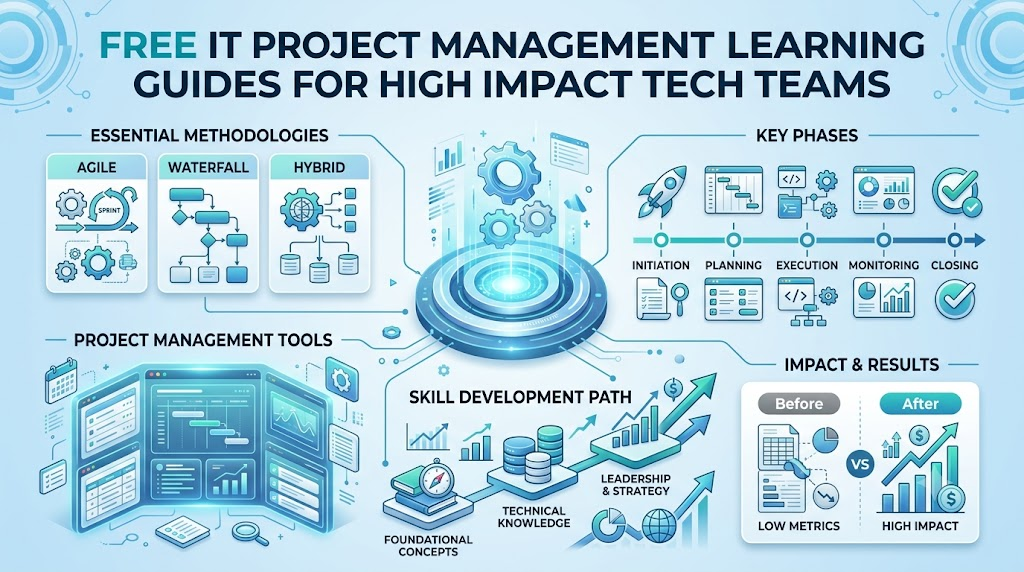
Managing tech work is like leading a big team sports game. An IT project manager helps computer programmers, designers, and testers work together as friends. They ensure everyone finishes software tasks on time without wasting company funds. When tech teams follow simple plans, they build awesome computer apps without stress.
You do not need to spend huge money to learn these leadership tricks. You can visit Freeebooks to grab helpful handbooks that explain basic project planning step by step. These simple guides teach you how to organize tech work and solve everyday computer issues quickly. Starting with these free tools will set you up for great future success.
What Is Information Technology Project Management?
An IT project is a special mission to build or fix computer tools. For example, your team might create a brand new mobile phone game. Another team might build a website to help animal shelters find homes for pets.
A project manager acts like a team captain. This leader helps workers choose who writes code, who draws art, and who tests buttons. Because tech work changes fast, good leaders always keep goals simple and clear.
Why Do Tech Teams Need Planning Handbooks?
Building software without a clear plan leads to messy computer programs. Sometimes programmers get confused and work on the wrong game levels. Other times, the team runs out of money before the app is ready.
Simple learning guides teach managers how to avoid these big mix-ups. They give teams clear roadmaps and helpful checklists. When everyone follows the same steps, projects finish smoothly and quickly.
Helpful Skills Found Inside Free Handbooks
Good guides teach you how to talk clearly with your teammates. You learn how to share work fairly so nobody gets tired or stressed. You also learn how to use digital task boards to watch progress.
- Clear Talking: Share project ideas using simple, friendly words every single morning.
- Smart Scheduling: Pick fair deadlines so programmers can finish tasks without rushing.
- Team Care: Help teammates remove roadblocks when software code does not work.
Picking The Best Method For Your Project
Tech leaders use special styles to finish tasks. One popular style is called Agile, which breaks huge jobs into tiny two-week goals. Another traditional style is called Waterfall, where you finish step one before starting step two.
Both styles work great depending on your project type. Agile works best when you want to change game ideas often. Waterfall works better when you build safe computer systems for hospitals or banks.
Key Operational Concepts You Must Know
Managing The Scope of Work
The project scope is the list of things your team promises to make. If you plan to build a digital bicycle, you must not suddenly add jet engines. Adding extra features without warning makes teams miss their deadlines.
Smart leaders write down every single job before starting the work. When a client asks for extra features later, the manager checks the schedule first. This habit keeps work balanced and protects the team from exhaustion.
Tracking Time and Deadlines
Every software project needs a smart calendar to track daily tasks. Managers use handy visual charts to see which team finishes their job first. For instance, artists must finish drawing characters before programmers can animate them.
Keeping an eye on the clock prevents last-minute panics. When a programmer gets stuck, the manager notices the delay early. Then, other teammates can jump in and help fix the broken code.
Watching Team Budgets
Every tech job costs money to buy computers, cloud servers, and pizza lunches. An IT budget keeps track of all these expenses in one tidy list. If software tools cost too much, the project might stop early.
Good leaders check their bank balances each week to avoid surprises. They find free software tools to save money whenever possible. Managing cash well makes company bosses very happy and keeps jobs safe.
Spotting Project Risks Early
A project risk is an unexpected trouble that could harm your plan. For example, a heavy rainstorm could cut the office internet power. Or, a key programmer might catch a bad cold and stay home.
Smart project managers prepare for bad surprises ahead of time. They keep extra internet hotspots and backup computer copies ready. Planning for risks stops small hiccups from turning into giant disasters.
Platform Implementation vs. Culture — What’s the Real Difference?
| Daily Focus Area | Platform Implementation Tasks | Organizational Culture Habits |
|---|---|---|
| Main Target | Setting up digital task boards and chat tools. | Teaching coworkers to trust each other every day. |
| Everyday Action | Clicking buttons and testing software setups. | Helping teammates talk openly about hard problems. |
| Good Results | Fast servers and clean digital workspaces. | Happy workers who share ideas without fear. |
| Who Manages It | Computer engineers and network technicians. | Every team member, leader, and office manager. |
The Power of Good Software Tools
Using handy software tools makes daily office work much easier. Teams use digital whiteboards to drag and drop task cards as work gets finished. These screens show everyone what needs doing next without asking the boss.
However, great tools cannot fix an unhappy team. Even the most expensive software fails if people refuse to type updates. Software tools are simply digital helpers, not magic wands.
Building A Helpful Team Spirit
A friendly team culture is the secret sauce for great computer projects. Teammates must feel safe to say, “I am stuck and need help.” When leaders encourage kindness, workers solve bugs much faster.
Good culture also means celebrating small wins together every Friday afternoon. When managers cheer for hard work, team members feel proud and energized. Happy people naturally build better computer applications.
Real-World Use Cases of Modern Operations
Building Mobile Phone Apps
Smartphone app makers use quick daily check-ins to build games fast. Every morning, the team stands in a circle for five minutes to share updates. This simple habit keeps everyone working on the same goals.
- Game Designers: Draw fun monster characters and colorful game backgrounds.
- Sound Engineers: Record laser sounds and silly character voices.
- Code Testers: Play test levels to catch annoying glitches before kids download the game.
Upgrading School Computer Labs
School systems hire tech managers to bring safe laptops to student classrooms. These managers make sure every laptop connects to fast Wi-Fi networks safely. They also add security shields to keep bad internet strangers away from students.
Planning this work requires strict schedules so classes stay uninterrupted. The tech crew installs cables during summer breaks when hallways remain empty. Careful timing ensures students return to bright, working computers on day one.
Helping Hospitals Protect Patient Files
Hospitals save medical records on giant computer networks instead of paper folders. Project managers lead teams of security experts to protect these secret patient files. They test the backup systems to guarantee doctors can always view health notes.
A missed deadline here could cause serious medical trouble. Therefore, the manager checks every single step three times for complete safety. This careful work helps doctors save lives without worrying about computer crashes.
Common Mistakes in Operations Engineering
Trying To Build Too Much Too Fast
New project managers often try to finish huge jobs in single weekends. This rush causes tired programmers to write sloppy, broken computer code. Trying to sprint through a marathon always leads to painful crashes.
Instead, good leaders take steady, calm steps toward the finish line. They set small daily milestones that everyone can reach easily. Patient work keeps the software clean and workers smiling.
Forgetting To Talk With Clients
Sometimes tech teams lock their doors and build software for months without talking. Then, they show the final app to the client, who hates the design. This mistake wastes months of hard labor and thousands of dollars.
Simple Project Rule: Always show your work to the client every two weeks. Quick feedback stops teams from making costly mistakes that take weeks to fix.
Skipping Software Safety Tests
Rushing an app into the store without checking for bugs causes huge embarrassment. Players leave angry reviews when a phone game freezes on the main menu. Fixing bad code after launch costs ten times more effort.
Smart managers always save two weeks exclusively for friendly software testing. They let real people try every button to see what breaks. Good testing guarantees a smooth, joyful launch day.
How to Become an Operations Expert — Career Roadmap
Step One: Learn Basic Team Tools
Begin your journey by trying out free digital task boards online. Practice making small checklists for your school homework or daily household chores. This simple exercise builds strong habits for organizing bigger projects later.
- Junior Task Assistant: Organizes daily meeting notes and keeps online folders tidy.
- Project Coordinator: Sets up team calendars and tracks project equipment deliveries.
- Lead Project Director: Talks with company executives and leads large teams to victory.
Step Two: Practice Daily Communication
Next, practice speaking clearly and writing short, friendly email notes. Great managers explain tricky computer problems without using confusing tech buzzwords. When you can explain an idea to a friend, you can explain it to anyone.
Listen carefully when your friends talk about their own project troubles. Ask thoughtful questions to understand how you can help them succeed. Strong listeners always make the most beloved leaders.
Step Three: Earn Helpful Certifications
Finally, look for free online tests to earn beginner project certificates. These paper badges show future employers that you understand standard planning rules. You can study for these easy tests while finishing your daily classes.
Display your badges proudly on your personal website or work resume. Company bosses notice candidates who take the time to learn independently. Consistent learning opens bright doors to high-paying tech careers.
FAQ Section
- What does an IT project manager do every day?An IT project manager helps computer workers finish apps on time and within budget limits. They lead quick morning meetings, fix team problems, and talk with the company boss.
- Can I learn project management skills for free?Yes, you can read free online handbooks and watch helpful video guides without paying money. Many websites share great beginner lessons to help you start your career path.
- What is the difference between Agile and Waterfall methods?Agile breaks work into tiny, flexible goals that change every two weeks based on user feedback. Waterfall follows one strict straight line where each step finishes before the next step begins.
- Do I need to know how to write computer code to manage projects?No, you do not need to be an expert coder to lead a tech team well. You just need to understand basic computer ideas and be great at organizing people and tasks.
- Why do computer projects sometimes run out of money?Projects run out of cash when teams add too many unplanned features without checking the budget. Good managers watch expenses every week to make sure funds last until launch day.
Final Summary
Learning how to manage tech projects is a fantastic skill for your future. You do not need confusing words or expensive college classes to understand the basic ideas. By keeping project goals clear, tracking schedules, and being kind to teammates, anyone can lead.
Remember that happy teams build the best computer software in the world. Use free online study guides to practice organizing small tasks today. With patient practice and clear talking, you will grow into an awesome technology leader.