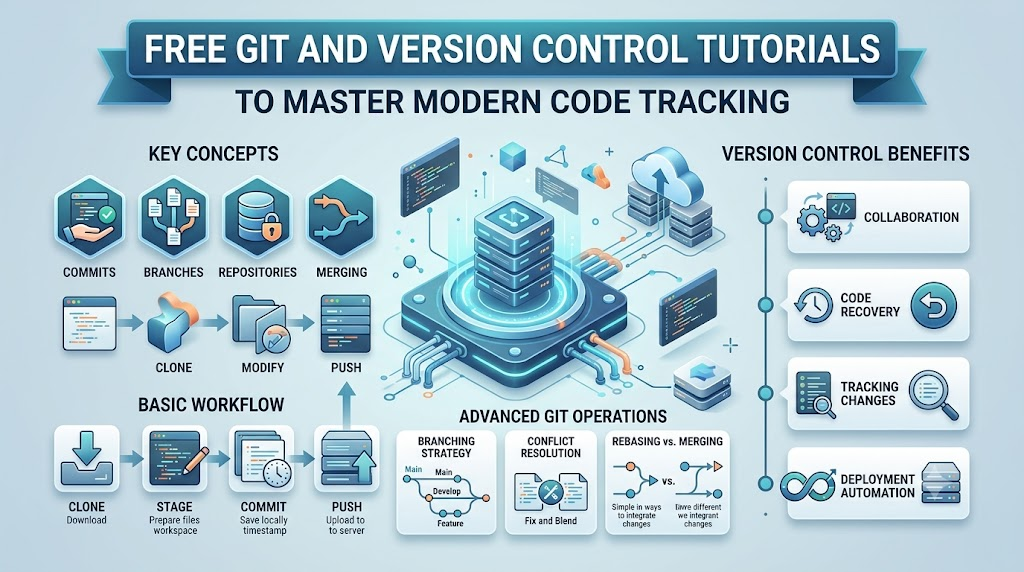
Version control lets computer programmers track every single edit they make to their software code. It works like a magic time machine for computer files. If you make a bad mistake, you can jump right back to yesterday’s working files. Because modern coders build big apps together, tracking every line of text keeps entire software projects completely safe.
You can learn these essential coding habits without spending a single dollar on school lessons. Check out the helpful Freeebooks library to find simple handbooks that explain basic software tracking step by step. These simple guides teach you how to save your work, share code with friends, and fix broken branches. Starting with these free tools gives you total confidence as an upcoming software builder.
What Is Git And Version Control?
Version control is a software system that records file changes over time. It creates snapshot pictures of your code whenever you finish a new feature. If an unexpected computer bug breaks your game, you can quickly restore an older snapshot.
A smart tool called Git handles this tracking work directly on your laptop. It runs quietly in the background without slowing down your computer. Coders everywhere rely on Git to keep their computer projects neat, tidy, and safe.
Why Do Coders Need Safe Time Machines?
Writing software code can get messy very fast when many people work together. Imagine three friends trying to write one single storybook on the same sheet of paper. People would accidentally erase sentences and write over each other’s words.
Version control solves this problem by giving every friend their own private sandbox. You can test silly ideas in your sandbox without ruining the main story. When your idea works, you neatly blend it into the main book.
Easy Features Found Inside Beginner Tutorials
Helpful online guides break big computer concepts into tiny, bite-sized daily lessons. You learn basic command words that tell your computer to save or load code files. You also learn how to read simple color-coded differences between old and new files.
- Tracking Changes: Watch exactly which lines of text you added or deleted today.
- Making Snapshots: Take safe photos of your working computer game before adding hard levels.
- Sharing Safely: Send your finished code to your friends across the internet easily.
Choosing The Right Workflow Style
Coders use different styles to organize their code files and team tasks. Some teams prefer working directly on one single main branch for super fast updates. Other teams make separate branches for every single new button or screen.
Beginner tutorials show you how to pick the simplest style for your group. Keeping workflows simple prevents confusion when merging files together. A clean setup lets your team write fun code without any scary surprises.
Key Operational Concepts You Must Know
Making Safe Snapshots With Commits
A commit acts like an official checkpoint in a video game. When you reach a checkpoint, your progress stays locked in forever. If your character falls into a trap later, you simply restart at that safe spot.
Writing short, polite notes for each commit helps your teammates understand your work. For example, write “Fixed the blue start button” instead of typing random letters. Clear notes make it super easy to find old fixes when bugs appear.
Working On Private Branches
A branch is an extra path that splits off from the main computer project. Think of it like a photocopy of your homework sheet. You can scribble notes on the copy without messing up the clean original page.
Coders build brand new features on private branches so the main app never crashes. If your experiment fails, you can simply delete the branch without any tears. When your experiment succeeds, you glue it back into the main project.
Combining Code With Clean Merges
A merge blends two different branches together into one complete project. Git reads both files and matches up the lines of code automatically. This smart matching saves programmers hours of boring copy-and-paste work every afternoon.
Sometimes two coders change the exact same line of code at the same minute. When this happens, Git politely pauses and asks you to pick the best sentence. Fixing these small hiccups teaches you how your app really works inside.
Storing Projects In Remote Repositories
A repository is a digital folder where Git stores all your files and snapshots. A remote repository keeps an extra copy of this folder high up in the internet cloud. Cloud backups ensure you never lose your hard work if your laptop breaks.
Online platforms let teammates share these cloud folders across the globe. You can upload your afternoon work so a teammate across the world can test it tonight. Cloud storage keeps modern remote teams connected and productive every day.
Platform Implementation vs. Culture — What’s the Real Difference?
| Daily Focus Area | Platform Implementation Tasks | Organizational Culture Habits |
|---|---|---|
| Main Target | Installing software tools and cloud storage spaces. | Teaching teammates to share honest updates daily. |
| Everyday Action | Setting up branch rules and automated build checks. | Helping coders review each other’s work with kindness. |
| Good Results | Safe servers and perfectly organized code archives. | Happy developers who learn from mistakes without fear. |
| Who Manages It | System administrators and senior DevOps engineers. | Every programmer, project leader, and team member. |
The Power of Good Tracking Tools
Installing tracking software gives your engineering team a solid digital workspace. Admins configure cloud accounts and set up digital locks to keep source code private. These automated systems check every file upload to make sure no junk gets inside.
However, great computer tools cannot fix poor communication between team members. Software will happily save bad, broken code if nobody checks it first. Powerful tools only succeed when people know how to use them properly.
Building A Helpful Team Spirit
A positive team culture encourages programmers to talk openly about confusing bugs. Coders review each other’s work to offer helpful tips and catch small typos. In a healthy team, finding a software bug is a happy chance to learn.
Leaders must teach workers that making mistakes is a normal part of coding. When people feel safe, they try bold new ideas that help the company grow. Strong culture turns a group of solo coders into an unstoppable crew.
Real-World Use Cases of Modern Operations
Building Team Video Games
Video game studios rely heavily on version control to coordinate giant creative teams. Game developers work alongside 3D artists, voice actors, and story writers every single day. Branching allows artists to add monster textures while programmers write movement physics.
- Game Programmers: Build jumping mechanics and battle systems on dedicated feature branches.
- Environment Artists: Upload 3D castle models and sky graphics into cloud storage folders.
- Game Testers: Play test builds and mark the exact commit where a glitch started.
Running Busy School Portals
University websites must serve thousands of eager students checking their test scores simultaneously. Web teams use version control to update school portals without taking servers offline. They test security updates on private preview servers before updating the live site.
Careful branch management prevents website crashes during busy semester enrollment mornings. If a server update causes trouble, engineers rollback to the morning snapshot in seconds. This reliability keeps school systems running smoothly all year long.
Securing Bank Mobile Apps
Mobile bank apps protect sensitive money accounts and personal customer information around the clock. Banking tech teams use strict branch protection rules to review every single code edit. Multiple senior engineers must inspect and approve changes before code reaches customer phones.
Version control creates a clear paper trail showing who touched each file and why. This record helps banks pass strict safety audits and spot security issues early. Clear tracking guarantees that customer money balances remain completely safe.
Common Mistakes in Operations Engineering
Making Giant Messy Commits
New coders often wait until Friday afternoon to save five whole days of work. This giant commit mixes fifty different code fixes together into one huge, confusing blob. If one small part breaks, finding the bad sentence becomes nearly impossible.
Instead, make tiny commits every time you finish a single small job. If you fix a color on a button, save that work immediately. Small, frequent saves make your project timeline crystal clear to read.
Writing Confusing Commit Notes
Typing silly messages like “Fixed stuff” or “Changes” hurts your future self and your teammates. Two months from now, nobody will remember what those mysterious words actually mean. Bad notes force coders to waste time reading through hundreds of lines of code.
Simple Coding Rule: Always write short, honest commit notes that explain what you fixed. Use simple words like “Added gold coins to level three” so anyone understands right away.
Forgetting To Download Cloud Updates
Sometimes coders forget to pull the latest changes from their teammates before writing new code. When they finally try to upload their work, their computer gets totally confused. This mistake creates giant merge conflicts that take hours of boring work to fix.
Make it a daily habit to download updates first thing every morning. Starting your day with the freshest code keeps your local files completely in sync. Staying updated saves you from huge team headaches later in the afternoon.
How to Become an Operations Expert — Career Roadmap
Step One: Learn Basic Terminal Words
Begin your journey by opening the command terminal on your laptop or home computer. Learn basic keyboard words to move between desktop folders, create text files, and check Git status. Typing simple commands gives you direct control over your computer file system.
- Junior Code Tracker: Creates local repositories, makes small commits, and pulls daily team updates.
- Release Coordinator: Manages code branches, tests release candidates, and resolves merge conflicts.
- DevOps Infrastructure Lead: Automates cloud pipelines, sets safety policies, and guides overall workflow design.
Step Two: Practice Safe Branching
Next, practice creating separate branches whenever you try out a new project idea. Build a simple website page about your favorite hobby and test different layout colors. Try merging your favorite branch into the main project to see how files combine.
Intentionally cause a small merge conflict by changing the same line on two branches. Then, practice reading the warning flags and picking the best line to keep. Learning to fix conflicts calmly turns you into a fearless software developer.
Step Three: Share Open-Source Projects
Finally, upload your favorite hobby projects to online cloud communities for other learners to explore. Look at beginner-friendly open-source projects and offer to fix tiny typos in their documentation. Contributing to public projects lets you practice team collaboration in the real world.
Active community involvement shows future employers that you know how to write software with others. Keep practicing your tracking skills and sharing helpful code with friends online. Steady practice will transform you into a respected version control expert.
FAQ Section
- What is the difference between Git and cloud hosting platforms?Git is the free tracking software that runs on your personal computer machine. Cloud platforms are online websites where you upload and back up your Git project folders.
- Can version control help me if I work completely alone?Yes, version control protects solo coders from making disastrous mistakes on their own computers. You can test crazy ideas on private branches and undo bad bugs with one click.
- What happens if I accidentally delete my project folder?If you pushed your work to a remote cloud repository, your code remains completely safe. You simply download a fresh copy from the cloud to your laptop and keep working.
- Do I have to pay money to use version control tools?No, Git is completely free open-source software that anyone can download and use. Many cloud websites also offer generous free accounts to store your student code projects.
- What is a merge conflict and should I be scared of it?A merge conflict happens when two teammates change the same sentence differently at the same time. You should never feel scared because Git lets you review and choose the winning line.
Final Summary
Learning version control is like discovering a super shield for your computer programming career. You never have to worry about losing your best code or breaking working apps again. By using commits, branches, and merges, you can build exciting digital projects with friends smoothly.
Always remember that simple habits create the best software in the world. Make tiny saves often, write helpful commit notes, and treat your teammates with kindness every day. Dive into free online guides today to practice these skills and level up your coding journey.