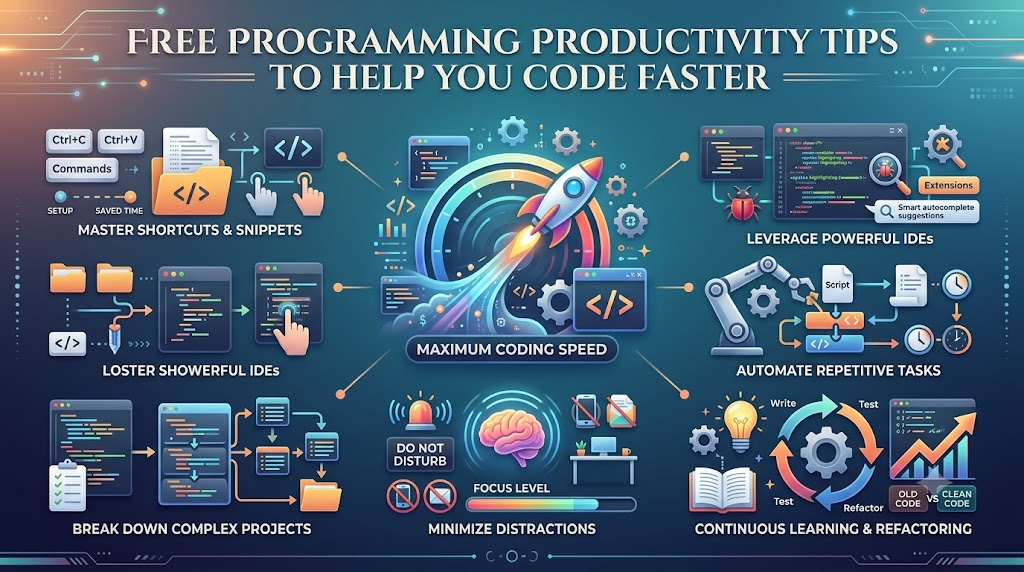
Writing computer code takes time and focus. Many new coders work hard, but they work slowly. You can fix this problem with smart daily habits.
You do not need to buy fancy tools. Instead, visit Freeebooks to find great guides for your learning journey. These simple reading materials help you finish projects without stress.
What Is Programming Productivity?
Productivity means finishing your work well without wasting your energy. For a coder, this means writing clean instructions for computers quickly.
When you code with good habits, you make fewer mistakes. You also finish homework or projects much faster. That gives you more free time to play and rest.
Break Big Jobs Into Small Steps
Big projects often look scary at first glance. For instance, making a video game takes many lines of text. Do not try to build the whole game in one day.
Instead, cut your big project into tiny steps. Build one simple button before lunch. Next, make a sound play when you click that button.
- Pick one small goal to finish first.
- Write a list with only three tasks.
- Cross off each task to feel proud.
Key Operational Concepts You Must Know
Understanding Your Code Workspace
Your workspace is the app where you type your code. People call this an editor or an integrated development environment.
Learn how to change the colors of your screen to rest your eyes. Also, keep your project files neat and tidy in marked folders. A neat folder structure helps you find your files in seconds.
The Power Of Keyboard Shortcuts
Reaching for your mouse takes your hands off the keys. Moving back and forth slows you down a lot.
So, learn simple keyboard shortcuts to save time every hour. Shortcuts let you copy, paste, and find words with two fingers.
| Shortcut Keys | What It Does | Why It Helps |
|---|---|---|
| Ctrl + C | Copies your text. | You never type the same line twice. |
| Ctrl + V | Pastes your text. | It moves words across files instantly. |
| Ctrl + F | Finds any word. | It searches big files in one second. |
| Ctrl + Z | Undoes your mistake. | It fixes errors without any panic. |
Version Control In Plain English
Version control is like a magical save button for your project. It saves snapshots of your work as you make changes.
If you make a huge mistake, you do not need to cry. You can roll your project back to an older, working copy. Git is a free tool that does this job for programmers worldwide.
Platform Implementation vs. Culture — What’s the Real Difference?
| Daily Focus Area | Tool Setup Focus | Team Culture Focus |
|---|---|---|
| Main Goal | Installing apps and setting up computers. | Helping people talk kindly and work together. |
| Everyday Action | Downloading code editors and extra tools. | Sharing ideas and asking for quick help. |
| Big Win | Fast computers that run code without crashing. | Happy teammates who solve puzzles as a team. |
Setting Up Your Tools Correctly
Getting your computer ready is the first major step. You need to install your code editor and language tools.
Make sure your setup runs smoothly before you start a large project. Test your tools with a tiny test program first. Good tools make your daily work feel easy and smooth.
Building A Helpful Daily Habit
Tools cannot do the thinking for you. You also need a positive mindset to learn and grow.
Share your code with friends and ask them for feedback. Be open to learning from your silly errors every single day. A helpful attitude turns hard problems into fun adventures.
Real-World Use Cases of Modern Operations
Automating Repetitive Daily Tasks
Programmers write tiny helper scripts to do boring tasks automatically. A script is a small list of computer commands.
For example, you can write a script to rename one hundred photo files. Doing that by hand takes an hour of clicking. But a smart script does the whole job in two seconds.
Running Quick Automatic Checks
Smart teams use automated test systems to check their code. These tools test every single line of code after every change.
If a new change breaks an old feature, the tool sounds an alarm. Because the tool catches bugs fast, customers never see the broken pages.
- Beginner Coder: Writes small tests to check basic math functions.
- Team Leader: Sets up automated tests for the whole project.
- Company Manager: Reads test reports to verify that everything works safely.
Common Mistakes in Operations Engineering
Writing Too Much Code Before Testing
Many beginners write code for hours without checking their screen. Then, they run the program, and nothing works.
Finding one tiny bug inside five hundred lines of code is very hard. Instead, test your code after writing just three lines. You will spot your errors immediately and fix them easily.
Helpful Tip: Never leave your desk before testing your latest change. Small tests save you from big headaches later.
Forgetting To Write Simple Notes
Code looks like a secret code language. If you look at your code next month, you might forget how it works.
So, write short notes called comments inside your code files. Comments explain what your code does in plain words. The computer ignores these notes, but your human brain will thank you.
Keeping Too Many Browser Tabs Open
Having thirty open internet tabs can confuse your mind. Your computer also slows down when you run too many web pages.
Close tabs that you do not need right now. Keep only your project page and your guide open. A clean screen creates a clear, sharp mind.
How to Become an Operations Expert — Career Roadmap
Step One: Learn The Basics Well
Start with one easy language like Python or basic web languages. Practice simple math games and word puzzles every week.
Read free beginner guides online to build your confidence. Do not rush to learn ten languages at once. Mastering one single tool gives you strong coding power.
Step Two: Build Tiny Projects Daily
Reading books helps, but building real things teaches you the most. Create a tiny calculator, a guessing game, or a digital birthday card.
When your code breaks, read the error message carefully. Puzzles make your brain stronger every time you solve them. Soon, you will create larger apps all by yourself.
- Junior Learner: Builds tiny games and solves simple logic puzzles.
- Skilled Builder: Connects databases and builds full websites.
- Expert Guide: Teaches other people and manages big code systems.
FAQ Section
- How much time should I practice coding each day?Thirty minutes of daily practice works better than five hours on Saturday. Steady daily practice keeps your brain sharp and helps you remember concepts.
- What should I do when my code shows an error?Do not panic because every programmer sees errors every single day. Read the error message line by line to see where the problem lives.
- Are free coding guides good enough to learn real skills?Yes, free guides provide clear lessons and practical examples. Many professional programmers learn their basic skills using free online materials.
- Why do I need to learn keyboard shortcuts?Shortcuts help you move text around without touching your mouse. They save you several minutes of work every single hour.
- Can a fifth grader really learn how to write code?Yes, anyone can learn to write computer code with simple steps. Coding is just like building with digital plastic blocks.
Final Summary
Boosting your coding speed does not require magic or expensive gear. You only need clean habits, smart tools, and steady daily practice. Break your giant jobs into bite-sized tasks so you never feel stuck. Use keyboard shortcuts and automated scripts to handle your boring chores quickly.
Remember to test your small code changes often. Take short walks to rest your eyes and give your brain a break. As you read free guides and practice each day, you will code faster, make fewer errors, and have fun.