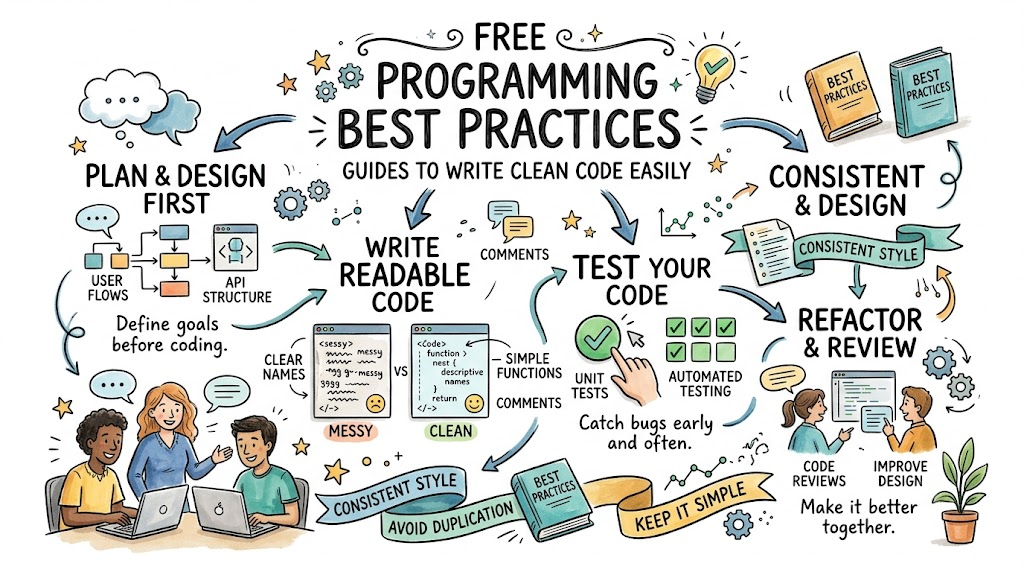
Computers run on clear rules that humans write. These written lines of instructions are called code. When coders write clean code, computer programs run very fast. But messy code causes glitches and breaks helpful software tools. You can find free reading materials on Freeebooks to guide your study.
Writing software is just like writing a story for a friend. Your friend must read and follow every page with ease. Good coders follow shared team habits to keep projects neat. These free guides teach you the best ways to work every day.
What Good Coding Means
Good coding means creating software that is simple to read. It also means building tools that other people can fix later. Anyone can write code that a computer runs. But great coders write code that humans understand right away.
Messy code creates hidden bugs that cause big system crashes. A bug is simply an error that makes software freeze up. When you follow simple habits, you stop these errors early. Good habits save valuable hours for everyone on the team.
[Write Clean Lines] ➔ [Test For Bugs] ➔ [Review With Team] ➔ [Launch Great Apps]
Four Vital Habits For Clean Code
Pick Clear Names For Everything
Coders store values inside labeled boxes called variables. Always give these boxes clear names that tell the truth. For example, name a box user_age instead of using the letter x. Clear labels help your teammates read your work without guessing.
Also, keep your function names clear and punchy. A function is a mini job that your program runs. Name your jobs using active action words like send_email or print_page. Good names turn messy code into an easy story.
Keep Every Function Small
Never force one single code block to do five jobs. When a code block does too much, it breaks easily. Instead, build small blocks that do only one simple thing. Small parts are easy to test and quick to fix.
If a block grows past ten lines, look closely at it. You can often break big blocks into two smaller blocks. Then, you can reuse those small blocks across your whole project. Simple blocks make your software strong and steady.
Leave Short Helpful Notes
Coders leave short text messages inside their files called comments. These tiny notes explain why you built a tool in a certain way. But never write notes that merely repeat obvious facts. Write notes only when a complex choice needs a human explanation.
Good notes help future coders understand your private reasoning. If you return to your files next year, you will remember your plan. Clean notes act like friendly road signs inside your digital project.
Format Your Lines With Care
Neat spacing helps your human eyes scan through code quickly. Always indent your loops and functions with neat, matching spaces. Messy spacing looks like bad handwriting and hides common syntax errors. A syntax error is a spelling mistake that stops your program.
Most code tools can tidy your files with one click. Let these auto tools clean up your margins and empty lines. Clean pages make software fun and easy for everyone to read.
Key Operational Concepts You Must Know
Setting Up Version Tracking
Coders use version tracking tools to save their work safely. Think of this tool like an endless undo button for your files. If you make a bad mistake, you can jump back instantly.
These tools also allow many coders to work together safely. Each person writes new lines on a private side path called a branch. Then, the team checks the new lines before adding them in. This neat process keeps the main software safe from broken code.
Running Automated Test Runs
Testing your software by hand takes up way too much time. So, smart coders write tiny test programs that check their work. These automated tests test every button and math sum in seconds.
Whenever you add a new trick, run your tests again. If an old feature breaks, your test sends a bright red alert. Catching mistakes this early saves your team from big launch day headaches.
Conducting Peer Reviews
Never send your new code to real users all by yourself. Instead, invite a friendly teammate to read your lines first. Tech teams call this helpful checkup a code review.
A teammate can spot tricky bugs that your eyes missed completely. They can also suggest simpler ways to solve hard problems. Reviewing code helps the whole team learn and grow together.
Platform Implementation vs. Culture — What’s the Real Difference?
| Daily Work | Platform Tool Setup | Team Culture and Habits |
|---|---|---|
| Main Goal | Install code linters and run test servers. | Teach teammates to care about neat code and kindness. |
| Daily Tasks | Write setup scripts and build code pipelines. | Talk about simple designs in morning team meetings. |
| Key Measure | Count test runs and track server build speeds. | Watch how often coders help each other fix issues. |
| True Owner | Managed by system administrators and tools. | Owned by every single person who writes code. |
Installing Automated Tools
Teams often buy fancy software to scan their daily files. These scanners look for bad lines and flag missing spaces. Scanners run very fast and catch many silly typing errors.
However, a code tool cannot teach a human to care. Tools can point out flaws, but they cannot fix bad logic. You need human wisdom to choose the cleanest design path.
Building Helpful Team Mindsets
A great team culture rewards coders who write simple lines. Coders feel safe asking for help when a problem feels hard. They do not show off by writing tricky, confusing code.
Instead, they take real pride in making things easy for others. When someone finds a bug, nobody points fingers or shouts. The team works together to fix the issue with smiles.
Real-World Use Cases of Modern Operations
Improving Mobile Phone Games
Game coders must keep their software running very smooth and fast. If a game slows down, players get mad and delete it. By writing clean loops, coders save memory on small mobile phones.
Clean code also makes it easy to add fun new game levels. The developers drop new maps into place without breaking older levels. As a result, players enjoy smooth play and fun weekly updates.
- Game Designers: Create fun map layouts that drop right into the engine.
- Engine Coders: Write small, fast functions to draw characters on screen.
- Bug Testers: Play test builds to catch weird visual glitches early.
Protecting Banking Software
Banks use huge code systems to track family savings accounts safely. A tiny math error could send money to the wrong person. Therefore, bank coders follow the strictest clean code rules in the world.
They run hundreds of automated tests on every tiny math change. They also write simple functions that check account balances twice. Because their code is simple, bank systems stay secure and run smoothly.
Common Mistakes in Operations Engineering
Writing Overly Clever Lines
Some new coders like to write super short, tricky lines of code. They think tricky code proves they are very smart geniuses. But tricky lines confuse teammates and hide dangerous software errors.
Always pick the clearest way to write an idea, not the shortest. If a normal reader cannot understand your line, rewrite it. Clear code is always better than clever code.
Simple Coding Truth: Write your code so simply that any beginner can read it. If a ten-year-old kid can follow the steps, your design is truly great.
Refusing to Delete Dead Code
Coders sometimes leave old, unused code sitting inside active files. They worry that they might need those old lines sometime next year. But dead lines confuse new coders and clutter up search results.
Trust your version tracking tools to remember past ideas. If you do not use a line of code today, delete it. Keeping your workspace clean makes daily work much lighter.
Skipping Daily Bug Tests
Rushing to ship features without writing tests causes massive disasters later. You might save ten minutes today, but you will lose days tomorrow. Broken software makes users unhappy and damages your company name.
Make testing a regular part of your daily work routine. Write tests while you build the actual features, not after. This smart habit lets you sleep peacefully every single night.
How to Become an Operations Expert — Career Roadmap
[Master Basic Syntax] ➔ [Learn Clean Design] ➔ [Lead Team Reviews]
Learning Foundational Syntax
Start your journey by picking one friendly language like Python. Learn how to write simple loops, conditional tests, and basic math functions. Practice every afternoon by building small games or simple math tools.
Read free digital books to learn how real pros format their files. Copy good examples by hand to build muscle memory. Doing this builds a rock-solid base for your coding future.
Building Real-World Projects
Next, build complete projects and share them openly online. Try building a personal habit tracker or a simple weather reader. Focus on writing clean names, short functions, and great tests for each tool.
- Junior Software Builder: Writes neat functions and fixes small system bugs.
- Mid-Level Systems Coder: Designs clean software modules and helps junior peers.
- Lead Project Architect: Chooses top design patterns and guides team culture.
Guiding Other Developers
Finally, teach your clean habits to new coders who join your team. Run friendly code reviews and write clear guides for your company. Great developers know how to lift up everyone around them.
Companies love hiring coders who communicate with warmth and clarity. Keep reading new guides, stay humble, and practice your craft daily. You will soon become a trusted guide in the software world.
FAQ Section
- Why should I read free guides about coding habits?These free handbooks teach you professional team habits without charging you money. They show you how to write neat code that real companies love to hire.
- What is the most vital rule for clean code?The most vital rule is to keep everything simple and clear for humans. Always pick obvious variable names and keep your functions short and focused.
- Can bad code really break a good business?Yes, messy code creates bugs that cause software to freeze and crash. When software crashes, users leave and the business loses time and money.
- Do I need to memorize every single coding command?No, real coders look up commands and syntax rules on search pages every day. You only need to understand the main ideas and clean habits.
- How long does it take to build good coding habits?You can learn the basic rules in just a few days of reading. But you must practice writing clean lines every single day to make them second nature.
Final Summary
Learning clean coding habits is the best move any new programmer can make. When you write clear lines, you save time, stop bugs, and help your friends. Remember to pick simple names, keep functions small, and test your work every day.
Take advantage of free online guides to sharpen your engineering skills today. Share what you learn with your teammates, ask questions, and keep your files tidy. By building neat software habits now, you set yourself up for a long, happy tech career.